Why Your Smart Plug Clicks Off Under Load
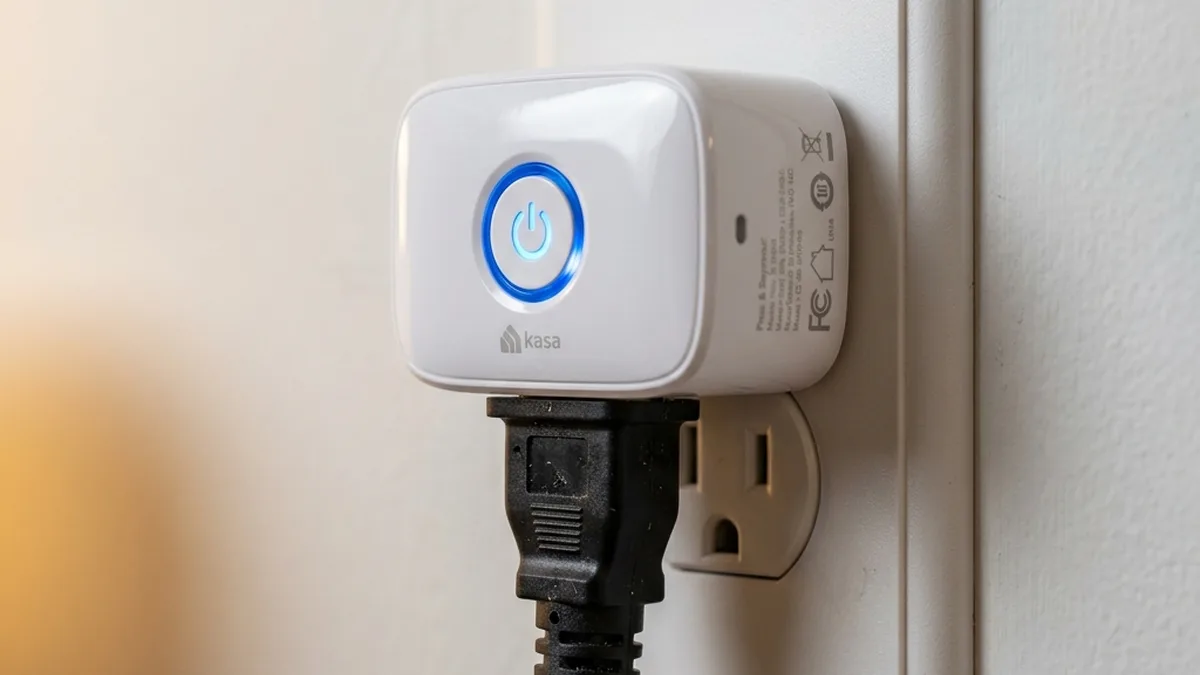
You meticulously planned your morning routine: a smart plug connected to your space heater would pre-warm your home office before your alarm. For ten glorious minutes, it works. Then, a distinct “CLICK,” followed by silence. The heater is off. You check your smart home app—the plug is marked “Offline.” A quick touch reveals the casing is uncomfortably warm, perhaps even hot. What just happened? You’ve just experienced a crucial, albeit inconvenient, safety intervention, likely averting a serious electrical incident.
Smart plug behaviour is best understood from the internal schematics and the measured performance of the relay and the radio inside them. A pattern consistently reported across owner communities and manufacturer bulletins is the significant discrepancy between a smart plug’s advertised capabilities and its long-term operational reliability, particularly concerning its internal switching mechanism. Often, the silent killer of devices like Wemo And Eve Plugs isn’t just sustained overload, but the transient electrical phenomena known as “Inrush Current.” Let’s meticulously dissect the electrical, hardware, and networking factors that cause your smart plug to go “Click, Pop, Off.”
Is Your Smart Plug Operating Safely?
Is connected device > 1200W (10A) or inductive?
Is firmware updated? Device responding locally?
The Amperage Deception: Continuous Current Ratings and Thermal Limitations
The most common cause of smart plug failure and safety shutdowns stems from a fundamental misunderstanding of electrical load ratings. Most entry-level smart plugs are marketed with a 10 Ampere (A) Rating, which translates to approximately 1200 Watts (W) at a nominal 120 Volts (V) in North America (P = V × I). However, standard residential wall outlets are typically rated for 15 Amperes, protected by a 15A circuit breaker. If you connect a 1,500W space heater to a 10A smart plug, you are attempting to draw 12.5 Amperes (1500W / 120V) through a device explicitly designed for a maximum continuous current of 10A. This 25% overload, while seemingly minor, creates significant thermal stress.
Underlying Electrical Principles and Component Stress
Electrical current flowing through a conductor generates heat due to resistance (Joule heating, P = I²R). Inside a smart plug, the current path involves several components: The input terminals, the printed circuit board (PCB) traces, the internal relay contacts, and the output terminals. Each of these components has a specific current-carrying capacity, determined by material, cross-sectional area, and thermal dissipation characteristics. When current exceeds the rated limit:
- PCB Traces: The copper traces on the PCB, designed for a specific gauge, will experience increased resistance. This elevated resistance causes the traces to heat up, potentially leading to delamination from the substrate, charring, or even acting as a rudimentary fuse, burning out entirely.
- Relay Contacts: The most vulnerable point is often the electromechanical relay. These relays typically consist of a coil that, when energized, creates a magnetic field to physically close metal contacts, completing the circuit. Overcurrent causes excessive heat at these contact points, leading to a phenomenon called “contact welding,” where the metal surfaces literally fuse together, preventing the relay from opening and cutting power.
- Thermal Runaway: Sustained overcurrent elevates the internal temperature of the entire device. Plastics can soften or melt, insulation can degrade, and critical semiconductor components (like the microcontroller or power supply ICs) can fail prematurely or catastrophically. Reputable smart plugs incorporate thermal sensors to detect these dangerous temperature excursions and trigger an immediate shutdown, often with an audible “CLICK” as the relay disengages.
It’s crucial to distinguish between a device’s peak current rating and its continuous current rating. Many 10A plugs can momentarily handle slightly higher currents, but prolonged operation above their Continuous Current Rating (CCR) will inevitably lead to overheating and protective shutdowns, or worse, permanent damage and fire risk. Always aim for a smart plug whose CCR exceeds your appliance’s steady-state power draw by at least 20% for a safety margin.
| Appliance Type | Typical Power Draw (Steady-State) | Load Type | Minimum Smart Plug Requirement (US 120V) |
|---|---|---|---|
| LED/Table Lamp | 5W – 100W (0.04A – 0.83A) | Resistive/Capacitive | Any (10A is fine) |
| Coffee Maker | 800W – 1400W (6.7A – 11.7A) | Primarily Resistive | Strictly 15A (preferably 16A rated) |
| Space Heater / Portable AC Unit | 1200W – 1800W (10A – 15A) | Resistive / Inductive (for AC) | Heavy-Duty 15A or 20A Only (e.g., Shelly Plus 1PM) |
| Refrigerator / Freezer | 100W – 800W (0.83A – 6.7A) | Highly Inductive (Motor) | 15A/20A with High Inrush Rating (Solid-State Relay recommended) |
| Vacuum Cleaner | 600W – 1500W (5A – 12.5A) | Inductive (Motor) | Strictly 15A (consider Inrush) |
Resistive vs. Inductive Loads: The Silent Threat of Inrush Current
Scenarios where a user connects a seemingly low-wattage refrigerator to a 15A rated smart plug, only for the relay to “weld” shut or fail within weeks. The paradox here lies in the fundamental difference between load types:
- Resistive Loads: Appliances like space heaters, toasters, incandescent bulbs, or electric kettles convert nearly all electrical energy into heat or light. They draw a relatively stable and predictable current once energized, characterized by a power factor close to 1.0.
- Inductive Loads: Appliances containing electric motors, such as refrigerators, washing machines, fans, air conditioners, and pumps, present a far more challenging load. These devices exhibit a phenomenon known as Inrush Current.
The Physics of Inrush Current and Relay Damage
When an inductive load is first energized, particularly a motor, its initial current draw can be significantly higher than its steady-state operating current. This surge occurs because the motor’s windings act as inductors. At startup, before the motor can generate a back electromotive force (back-EMF) to oppose the applied voltage, the impedance of the windings is primarily resistive. The initial current, therefore, is limited only by the winding resistance and the supply voltage, leading to a massive, momentary spike. This “Locked Rotor Amperage” (LRA) can be 3 to 10 times the motor’s “Running Load Amperage” (RLA), lasting for several AC cycles (tens to hundreds of milliseconds).
When this massive current spike flows through the contacts of an electromechanical relay, several destructive processes can occur:
- Arcing: As the relay contacts close, a minute air gap exists just before full closure. The high inrush current can “arc” across this gap, generating intense heat (thousands of degrees Celsius). This arc erodes the contact material over time.
- Material Transfer: The heat from arcing can cause microscopic particles of contact material (often silver alloy) to melt and transfer from one contact to the other. This creates uneven surfaces, leading to higher resistance, more arcing, and eventually, contact welding.
- Contact Welding: If the inrush current is sufficiently high and sustained even for milliseconds, the molten contact material can fuse together. This effectively welds the relay contacts shut, rendering the smart plug permanently “on” or unresponsive to control signals, creating a significant safety hazard as the circuit cannot be opened.
This is why a 100W fan might momentarily draw 500W or more during startup, and a refrigerator, despite its relatively low average wattage, can destroy a standard relay due to its compressor’s LRA. High-quality smart plugs designed for inductive loads often feature heavy-duty 16A or 20A relays with larger contact surfaces, specialized contact materials, and robust arc suppression (e.g., using a snubber circuit or varistor) to mitigate these effects. Some advanced plugs employ Solid-State Relays (SSRs), which use semiconductors (like TRIACs or MOSFETs) instead of physical contacts, offering silent operation, faster switching, and superior resistance to inrush current and contact welding, though they typically have higher “on-state” resistance and may generate more heat themselves.
The Safety Mandate: Internal Shutdowns, Protection Circuits, and Regulatory Compliance
When your smart plug abruptly shuts off, it’s typically not a malfunction but rather the activation of its integrated Overload Protection System (OPS). This system is a critical safety feature designed to prevent component damage, overheating, and potential electrical fires. High-quality plugs from manufacturers like Shelly, Kasa, and Athom Integrate sophisticated thermal and amperage sensors, coupled with intelligent firmware, to monitor operating conditions in real-time. If the plug detects parameters exceeding its safe operational thresholds, it initiates an immediate power cutoff. It is paramount that you do not simply reset the plug and re-engage the appliance without investigating the root cause.
Advanced Overload Protection Mechanisms
- Overcurrent Protection (OCP): This is the primary defense against excessive current draw.
- Shunt Resistors: A low-resistance resistor is placed in series with the load. The voltage drop across this shunt is proportional to the current, which is then measured by an Analog-to-Digital Converter (ADC) on the microcontroller.
- Current Transformers (CTs) / Hall Effect Sensors: More sophisticated plugs, especially for higher currents, might use CTs or Hall effect sensors for non-invasive current measurement, offering better isolation and accuracy.
- Firmware Logic: The microcontroller continuously samples the current. If the measured current exceeds a predefined threshold (e.g., 110% of the rated current for more than a specified duration), the firmware commands the relay to open.
- Over-Temperature Protection (OTP): Monitors the internal temperature of the device.
- Thermistors / NTC Sensors: Temperature-sensitive resistors are strategically placed near critical heat-generating components (relay, power supply). As temperature rises, their resistance changes, which is monitored by the microcontroller.
- Thermal Cutoffs: Some plugs may include a non-resettable thermal fuse, which permanently breaks the circuit if a critical temperature is reached, indicating catastrophic failure.
- Software Control: If the internal temperature exceeds a safe limit (e.g., 75-85 °C), the firmware triggers a shutdown.
- Surge Protection: While not directly related to overload, many plugs also incorporate Metal Oxide Varistors (MOVs) to shunt transient voltage spikes (e.g., from lightning or grid fluctuations) away from sensitive internal electronics.
The Importance of Regulatory Compliance: UL, ETL, and CE
These certifications are not mere marketing labels; they represent rigorous third-party testing and adherence to stringent safety standards. For North America, UL (Underwriters Laboratories) And ETL (Electrical Testing Laboratories) Are the most recognized. For Europe, it’s CE (Conformité Européenne). A certified smart plug has undergone tests for:
- Continuous Load Test: Ensuring the device can handle its rated current for extended periods without exceeding thermal limits.
- Overload Test: Verifying the overload protection system trips reliably at specified current levels.
- Short-Circuit Protection: Confirming the device can withstand a short circuit without causing a fire or explosion.
- Dielectric Withstand Voltage: Testing the insulation integrity.
- Flammability of Materials: Ensuring plastic casings are fire-retardant.
- Component Quality: Verifying that internal components (relays, capacitors, wires) meet safety standards.
A smart plug lacking these certifications is a significant safety risk, as its internal components may be subpar, its overload protection unreliable or non-existent, and its construction potentially unsafe.
Beyond Power: The “Offline” Enigma and RF Network Health
Sometimes, your smart plug goes “Offline” not because of an electrical overload, but due to a breakdown in its communication with your smart home hub or Wi-Fi router. The RF environment is often a complex and invisible battlefield.
Understanding Wireless Protocols and Their Vulnerabilities
- Wi-Fi (IEEE 802.11 b/g/n on 2.4 GHz):
- Pros: Ubiquitous, no dedicated hub needed (for cloud-based).
- Cons: High power consumption (relative to other IoT protocols), susceptible to congestion, interference, and range limitations. 2.4 GHz is a crowded band.
- Interference Sources: Microwaves, cordless phones, Bluetooth devices, neighboring Wi-Fi networks (co-channel and adjacent-channel interference), and even faulty power supplies can emit significant Electromagnetic Interference (EMI) in the 2.4 GHz band.
- Signal Strength (RSSI): Measured in dBm (decibels relative to a milliwatt). A strong signal is typically -50 dBm to -60 dBm. Below -70 dBm, reliability drops significantly, leading to packet loss and disconnects.
- Zigbee (IEEE 802.15.4 on 2.4 GHz, sometimes sub-GHz):
- Pros: Low power, mesh networking (self-healing, extends range), local control often possible.
- Cons: Requires a dedicated Zigbee hub/coordinator. Shares 2.4 GHz band with Wi-Fi.
- Mesh Network Dynamics: Router devices (like mains-powered plugs) extend the network. Poor placement or too few routers can create “dead spots” for end devices.
- Channel Selection: Zigbee operates on channels 11-26. It’s critical to understand that Wi-Fi channel 1 (centered at 2412 MHz) significantly overlaps Zigbee channels 11-14, Wi-Fi channel 6 (centered at 2437 MHz) overlaps Zigbee channels 16-19, and Wi-Fi channel 11 (centered at 2462 MHz) overlaps Zigbee channels 21-24. Proper channel planning, such as setting Wi-Fi to channel 1 and Zigbee to channel 25 or 26, is crucial to minimize interference, as Zigbee channels 25 (2475 MHz) and 26 (2480 MHz) are specifically chosen to sit entirely outside the primary Wi-Fi 1, 6, and 11 spectrums.
- Thread (IEEE 802.15.4 on 2.4 GHz):
- Pros: IP-based mesh networking, low power, local control, enhanced security.
- Cons: Newer, still building ecosystem, requires a Thread Border Router. Shares 2.4 GHz band.
- Interoperability: Designed for Matter, aiming for broader device compatibility.
- Bluetooth Low Energy (BLE – operates on 2.4 GHz ISM band):
- Pros: Very low power, direct device-to-phone connection (often for setup). BLE utilizes 40 channels (2 MHz spacing) and employs Adaptive Frequency Hopping (AFH) to dynamically avoid Wi-Fi interference. Its 3 primary advertising channels (37, 38, 39) are strategically placed in the spectral gaps between Wi-Fi channels 1, 6, and 11.
- Cons: Limited native range (though mesh extensions like Bluetooth Mesh exist), typically requires a hub or central device for broader home automation integration.
Network Congestion and Latency
A crowded Wi-Fi network with many devices, especially those streaming video or gaming, can lead to high latency and packet loss for smart plugs. Even if the signal strength (RSSI) is good, the plug might struggle to communicate with the router if the airwaves are saturated. This can cause the plug to appear “Offline” or become unresponsive to commands, even if its power state is technically stable. Cloud-dependent plugs are particularly vulnerable, as communication relies on a stable connection all the way to the vendor’s servers and back.
+---------------------+      +-------------------+      +---------------------+
|                     |      |                   |      |                     |
|  Smart Plug (Wi-Fi) +------+  Wi-Fi Router   +------+  Internet Gateway   |
|                     |      | (2.4 GHz Band)    |      |                     |
+---------------------+      +--------+----------+      +----------+----------+
       ^                          |                            |
       |                          |                            |
       |                          | (High Interference / Congestion)
       |                          |                            |
       |                          v                            v
       |                    +-----------------+          +-----------------+
       |                    |                 |          |                 |
       +--------------------+  Neighboring    |          |  Cloud Services |
                            |  Wi-Fi Networks |          |                 |
                            +-----------------+          +-----------------+
Simplified Wi-Fi Smart Plug Communication Path with Potential Interference Points
Firmware and Software Intelligence: The Brain Behind the Brawn
The behavior of a smart plug isn’t solely dictated by its hardware; the embedded firmware plays a crucial role in its reliability, safety, and connectivity. A well-engineered firmware ensures accurate power monitoring, responsive control, and robust error handling.
Key Firmware Aspects
- Watchdog Timers: Both hardware and software watchdog timers are essential. These mechanisms automatically reset the microcontroller if it becomes unresponsive (e.g., due to a software bug or transient electrical noise), preventing the device from locking up indefinitely and becoming unreachable.
- Power Monitoring Algorithms: For plugs with energy monitoring (e.g., Shelly Plus 1PM, Kasa KP125), the firmware processes raw ADC data from current and voltage sensors. The accuracy of these readings depends on the quality of the sensors, the ADC resolution, and the calibration algorithms. Inaccurate power reporting can lead to misdiagnosis of load issues.
- Overload Logic: The firmware is responsible for implementing the precise trip thresholds and response times for overcurrent and over-temperature events. This includes differentiating between transient inrush currents and sustained overloads, potentially using dynamic thresholds or time-delayed trips.
- Network Stack Management: The firmware handles Wi-Fi, Zigbee, or Thread connectivity, including connection attempts, re-authentication, and graceful reconnection after disconnections. Poorly implemented network stacks can lead to frequent drops and “ghost” offline states.
- OTA (Over-The-Air) Updates: The ability to securely update firmware is critical for patching security vulnerabilities, fixing bugs, and improving performance or adding features. Always ensure your smart plugs are running the latest stable firmware.
Advanced Troubleshooting and Diagnostics Guide
To systematically identify why your smart plug is failing, a multi-faceted approach addressing both electrical and network domains is required.
| Observation | Primary Domain | Probable Cause | Recommended Action |
|---|---|---|---|
| Smart Plug “Clicks” and Shuts Off | Electrical | Overload (Continuous/Inrush), Thermal Excursion | Measure load, upgrade plug, check appliance for faults |
| Smart Plug casing is Hot to Touch | Electrical | Sustained Overload, Internal Resistance, Component Fault | Disconnect immediately, replace plug, verify load |
| Smart Plug marked “Offline” in App | Network | RF Interference, Poor RSSI, Network Congestion | Wi-Fi/Zigbee channel optimization, router placement, add repeaters |
| Plug unresponsive (no click/light change) | Electrical/Firmware | Hard Failure, Firmware Crash, Power Loss | Check outlet, factory reset, replace plug |
| Plug works locally but not via cloud | Network/Cloud Service | Internet outage, Cloud server issues, Router firewall | Check internet, router settings, vendor status page |
| Appliance runs fine when plugged directly | Electrical/Plug Fault | Smart plug is faulty, incompatible, or undersized | Replace plug, ensure correct rating for appliance |
- Electrical Load Verification & Audit:
- Measure Actual Load: Use a dedicated Kill-A-Watt meter or a smart plug with certified energy monitoring (like the Shelly Plus 1PM) to measure the peak wattage (including inrush) And continuous wattage of your appliance. Run the appliance for at least 30 minutes to capture its steady-state behavior.
- Calculate Amperage: Divide the measured wattage by your nominal line voltage (e.g., 120V in the US) to get the actual amperage. For inductive loads, also look for the “Locked Rotor Amps” (LRA) or “Starting Amps” on the appliance’s rating plate.
- Compare to Plug Rating: Cross-reference the appliance’s actual draw against your smart plug’s printed “Max Load” or “Continuous Current Rating.” Ensure there’s at least a 20% buffer (e.g., for a 10A plug, don’t exceed 8A continuous).
- The “Touch Test” (Cautionary): While the appliance is running under normal load, carefully touch the casing of the smart plug. If it feels uncomfortably hot (beyond just warm, similar to a hot cup of coffee), it indicates excessive internal resistance and imminent failure or a current overload. Disconnect immediately.
- RF Network Health Diagnostics:
- RSSI Check: Access your router’s administration interface or use a Wi-Fi analyzer app (e.g., NetSpot, Wi-Fi Analyzer) to check the Received Signal Strength Indicator (RSSI) for your smart plug at its installed location. Aim for -65 dBm or better.
- Channel Scan: Use a Wi-Fi analyzer to identify congested 2.4 GHz Wi-Fi channels in your area. If your router is on an overlapping channel (e.g., your router on Wi-Fi channel 6, and a neighbor also on 6), consider changing your router’s 2.4 GHz channel to 1 or 11 (non-overlapping).
- Zigbee/Thread Channel Optimization: If using Zigbee or Thread, ensure its operating channel does not overlap with your primary Wi-Fi channel. For instance, if Wi-Fi is on channel 1, set Zigbee to channel 25 or 26.
- Interference Sources: Temporarily power off potential EMI sources near the smart plug (microwaves, older cordless phones, fluorescent lights, poor quality USB chargers) to see if connectivity improves.
- Router/Hub Placement: Ensure your Wi-Fi router or Zigbee/Thread hub is centrally located and not obstructed by dense materials (concrete, metal). Consider adding a Wi-Fi repeater or a mains-powered Zigbee/Thread router (like another smart plug) to extend coverage.
- Ping Test (for Wi-Fi plugs): If your plug has a known IP address, use a `ping` command from a computer on the same network to test for packet loss and latency. High packet loss indicates a poor connection.
- Firmware & Device Health Check:
- Update Firmware: Always ensure your smart plug’s firmware is up to date via its manufacturer’s app or your smart home hub (e.g., Home Assistant). Firmware updates often contain stability fixes and performance improvements.
- Local vs. Cloud Control: If your plug supports local control (e.g., Home Assistant with ESPHome, Tasmota, or native local API), test its responsiveness when disconnected from the internet. If it works locally but fails with cloud, the issue is likely upstream (internet, cloud service).
- Reset & Re-pair: As a last resort for connectivity issues, perform a factory reset on the smart plug and re-pair it with your network/hub. This can clear corrupted network settings.
- Physical Inspection:
- Examine Plug & Outlet: Look for any signs of discoloration, charring, melting, or burning on the smart plug casing or the wall outlet. These are clear indicators of overheating and require immediate attention and replacement.
- Loose Connections: Ensure the smart plug is firmly seated in the wall outlet and the appliance’s plug is firmly seated in the smart plug. Loose connections can create resistance, leading to heat and arcing.
Frequently Asked Questions (FAQ)
Q1: Can I use a smart plug with a surge protector?
A1: Yes, generally. Plugging a smart plug into a quality surge protector is acceptable and can offer an additional layer of protection for the smart plug and the connected appliance from voltage spikes. However, be mindful of the total load on the surge protector itself, as it also has a maximum wattage rating. Avoid “daisy-chaining” multiple surge protectors or power strips. If the surge protector itself has an overload breaker, it might trip before the smart plug’s internal protection, which is also a valid safety mechanism.
Q2: Why does my smart plug click even without an obvious overload?
A2: Several reasons can cause a non-overloaded smart plug to click:
- Minor Load Fluctuations: Some appliances, even resistive ones, can have slight power fluctuations that momentarily trigger the plug’s overcurrent detection, especially if the plug is poorly calibrated or near its limit.
- Poor Quality Relay: Cheaper smart plugs may use lower-grade relays that are more susceptible to wear, arcing, or “chattering” (rapid opening and closing) even under normal loads.
- Intermittent Connectivity: If the plug loses and regains network connectivity repeatedly, it might reset its internal state or attempt to re-engage the relay, causing a click.
- Firmware Bugs: Less common, but a firmware bug could cause the relay to cycle unexpectedly. Ensure your firmware is updated.
- Scheduled Actions: Verify that no forgotten automation or schedule is configured to turn the plug on/off at that specific time.
Q3: What’s the difference between a smart plug and a smart outlet?
A3: A smart plug is an external adapter that plugs into an existing wall outlet, providing smart functionality to any appliance plugged into it. It’s portable and easy to install. A smart outlet (or smart receptacle) replaces your existing wall outlet with a new outlet that has integrated smart technology. Smart outlets offer a cleaner, more permanent installation, often support higher loads (e.g., 20A for specific circuits), and eliminate the bulk of an external plug. Both serve similar functions, but the smart outlet is typically more robust and aesthetically integrated.
Q4: How do I know if my smart plug has a Solid-State Relay (SSR) versus an Electromechanical Relay (EMR)?
A4: The easiest way to tell is by listening:
- Electromechanical Relays (EMR): Produce an audible “CLICK” sound when they switch on or off, as they involve physical moving parts. They are generally less expensive and more common.
- Solid-State Relays (SSR): Operate silently because they use semiconductor components (like TRIACs or MOSFETs) to switch power electronically, without any moving parts. They are more expensive but offer faster switching, longer lifespan, and superior resistance to inrush current for inductive loads. Manufacturers usually highlight SSRs as a premium feature in their product descriptions.
Q5: What are the long-term risks of ignoring an overloaded smart plug?
A5: Ignoring an overloaded smart plug carries significant risks:
- Fire Hazard: The most severe risk. Excessive heat generated by overcurrent can melt plastic, ignite surrounding materials, and lead to an electrical fire.
- Appliance Damage: Unstable power delivery or repeated sudden shutdowns can damage the connected appliance’s internal electronics or motor.
- Smart Plug Failure: The plug itself will fail prematurely, often with contact welding, rendering it permanently on or off, or destroying its internal circuitry.
- Circuit Breaker Trips: While a circuit breaker tripping is a safety feature, frequent trips indicate a persistent overload issue that needs addressing, not just resetting.
- Short Circuits: Extreme overheating can lead to insulation breakdown and internal short circuits within the plug, potentially causing an arc flash or further damage to your home’s electrical system.
Conclusion: The Intelligent Application of Smart Control
Smart plugs are undeniably the workhorses of the modern smart home, offering unparalleled convenience and automation. However, their utility is directly proportional to our understanding of their underlying electrical and networking limitations. By meticulously matching the smart plug’s specifications to the appliance’s actual power demands—considering both continuous and transient loads—and by ensuring a robust wireless communication environment, you can harness the full potential of these devices without compromising safety or reliability. Remember, a “Click, Pop, Off” isn’t a malfunction; it’s a vital warning. Heed it, diagnose it comprehensively, and upgrade your smart home infrastructure to truly intelligent, safe, and resilient standards.
- Verify Ratings: Always consult the “Max Load” or “Continuous Current Rating” printed on the smart plug’s casing and compare it against your appliance’s label.
- Upgrade for High-Draws: For resistive heaters, AC units, and especially motor-driven appliances, invest in 15A or 20A UL-listed smart plugs, ideally those with SSRs for inductive loads.
- Leverage Energy Monitoring: Use built-in power monitoring as a diagnostic tool to understand your appliance’s actual draw and identify potential overload scenarios proactively.
- Optimize Your Network: Diagnose and mitigate Wi-Fi congestion, reconfigure Zigbee/Thread channels, and ensure adequate RSSI for all your smart devices.
Struggling with plugs dropping “Offline” even when the power is fine? You likely have Wi-Fi EMI (Electromagnetic Interference) and co-channel congestion issues clogging your signal! For more in-depth network troubleshooting, consult our specialized guides.
About these guides
These guides are compiled and maintained by the Smart Home Expert editorial desk. Each one is built from manufacturer documentation and the published Zigbee, Z-Wave, Thread and Wi-Fi specifications, then written up as a diagnostic sequence you can follow in order. Found something that does not match your hardware? Tell us and we will correct the sheet.
Specifications and references
The primary documentation for the protocols and products discussed above. Where this guide gives a figure — a frequency, a voltage, a timeout — these are where it comes from.