Smart Garage Door Opener Losing Connection in the Garage
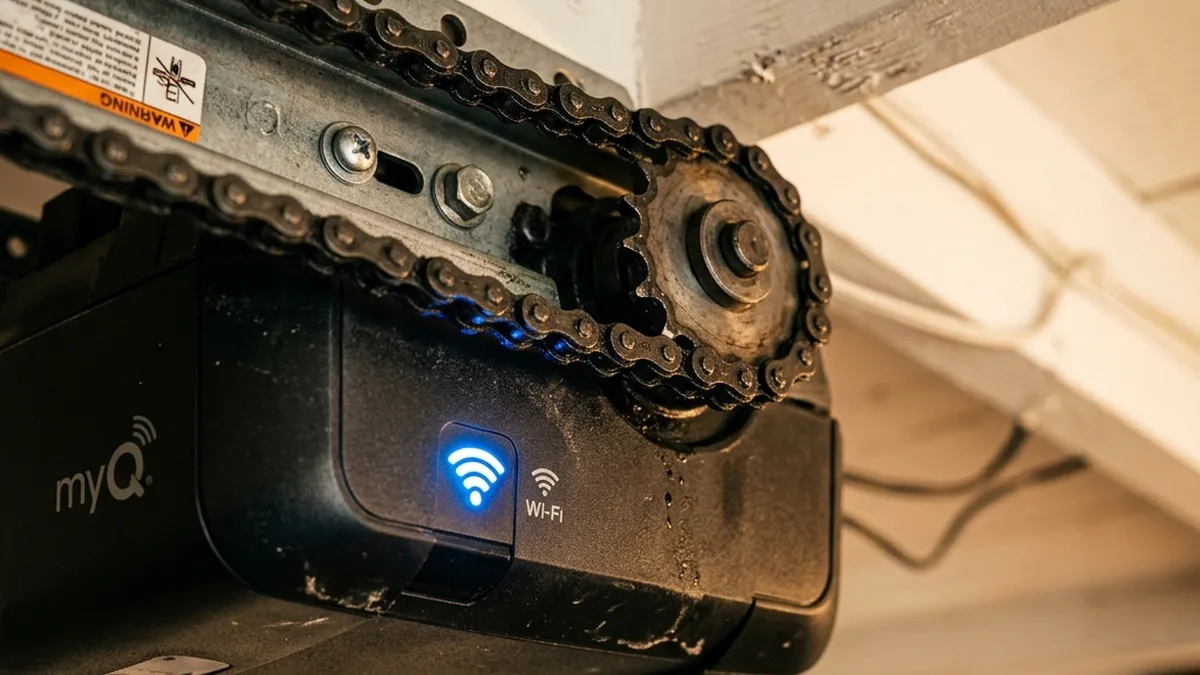
Quick Verdict: Navigating Garage Door Connectivity
Smart garage door connectivity is a complex interplay of RF physics, network architecture, and electrical stability. The primary culprits for signal struggles are often electromagnetic interference (EMI) From the motor’s starter capacitor or cheap LED lighting, and poor Wi-Fi signal strength (RSSI < -70 dBm) Due to distance and physical obstructions. For MyQ systems, ensure the hub is at least 4 feet from the motor and its antenna is straightened. For Wi-Fi-dependent devices like Meross, prioritize a static IP, enable mDNS, and consider a dedicated mesh node or access point for optimal 2.4GHz coverage. Always check for electrical issues like failing capacitors, which can cause intermittent reboots and false positives.
There is a special kind of frustration reserved for pulling into your driveway, hitting the “Open” button on your phone, and watching the little loading spinner circle endlessly while you sit in the rain. Your garage door is the boundary between your castle and the world, and in a smart home, it’s often the device furthest from your router. Garage layout dominates signal propagation here: RF physics, not simply bad Wi-Fi, is usually to blame for these ubiquitous connectivity woes.

Most smart garage openers rely on either a 2.4GHz Wi-Fi connection (IEEE 802.11b/g/n) or a proprietary RF signal (like Chamberlain’s 315MHz or 390MHz Security+ 2.0 protocol). Understanding the fundamental differences in these wireless communication methodologies is critical for a permanent fix. For instance, the Meross MSG100 is purely Wi-Fi dependent, leveraging standard TCP/IP communication for control, while the MyQ system uses a hub-to-motor wireless link operating on a specific sub-gigahertz frequency that is highly sensitive to antenna orientation and localized interference.
The Invisible Battlefield: Deconstructing RF Physics in the Garage
The garage environment presents a unique set of challenges for wireless communication. Unlike a living room, garages often feature dense construction materials, large metallic objects (vehicles, tools), and a plethora of electrical machinery, all of which conspire to degrade signal quality. A truly robust smart garage solution requires a deep understanding of these physical layer interactions.
Understanding Signal Attenuation and Link Budgets
Wireless signals lose strength as they propagate through space and materials—a phenomenon known as attenuation. This loss is measured in decibels (dB) and directly impacts the Received Signal Strength Indicator (RSSI), typically expressed in dBm. A lower (more negative) dBm value indicates a weaker signal. For reliable Wi-Fi connectivity, an RSSI better than -65 dBm is generally recommended, while -70 dBm often represents the threshold for consistent operation. Beyond -75 dBm, connection drops, high latency, and low data rates become commonplace.
The total signal path loss (L_total) is a sum of free-space path loss (FSPL), absorption by materials (L_material), reflection, diffraction, and scattering. The link budget is a calculation that accounts for all gains and losses from the transmitter to the receiver. It considers transmitter power (P_tx), antenna gains (G_tx, G_rx), and all losses (L_total) to determine the received power (P_rx). When P_rx falls below the receiver’s sensitivity threshold, communication fails.
Common garage materials and their approximate 2.4GHz attenuation:
| Material | Approx. 2.4GHz Attenuation | Notes |
|---|---|---|
| Drywall | 2-5 dB per wall | Relatively low attenuation. |
| Wood (solid) | 5-10 dB per wall | Moderate attenuation. |
| Concrete/Brick | 10-20 dB per wall | High attenuation, especially for reinforced concrete. |
| Metal (garage door, shelving, vehicles) | Severe signal degradation | Causes reflection, diffraction, and near-total absorption, creating “dead zones.” |
The 2.4 GHz Conundrum: Wi-Fi, Interference, and Co-Channel Congestion
The 2.4 GHz ISM (Industrial, Scientific, and Medical) band is the workhorse for most IoT devices due to its better penetration through obstacles compared to 5 GHz Wi-Fi. However, it is also incredibly crowded. Devices operating on this band use the IEEE 802.11b/g/n standards.
- 802.11b: DSSS (Direct Sequence Spread Spectrum) modulation, up to 11 Mbps.
- 802.11g: OFDM (Orthogonal Frequency-Division Multiplexing), up to 54 Mbps, backward compatible with 802.11b.
- 802.11n: MIMO (Multiple-Input, Multiple-Output) and channel bonding, up to 300 Mbps (with 40 MHz channel width).
The 2.4 GHz band in North America has 11 channels, but only channels 1, 6, and 11 are non-overlapping. When multiple Wi-Fi networks (your neighbors’, your own access points) or other 2.4 GHz devices (e.g., older Bluetooth BR/EDR devices, cordless phones, microwave ovens) operate on the same or adjacent channels, it leads to co-channel or adjacent-channel interference. While Bluetooth Low Energy (BLE), commonly used in smart home devices, utilizes 40 channels and Adaptive Frequency Hopping (AFH) to minimize Wi-Fi interference, older Bluetooth (BR/EDR) can still contribute to congestion. This increases packet retransmissions, latency, and effectively reduces throughput and reliability. Locking your 2.4 GHz Wi-Fi to a 20 MHz channel width (instead of 40 MHz) on channels 1, 6, or 11 can significantly improve stability by reducing overlap and interference, especially in dense environments.
Proprietary RF Frequencies: 315 MHz and 390 MHz
Chamberlain’s MyQ systems, particularly the hub-to-motor communication, often utilize proprietary RF protocols operating at 315 MHz or 390 MHz. These sub-gigahertz frequencies offer distinct advantages over 2.4 GHz Wi-Fi:
- Better Penetration: Lower frequencies generally penetrate solid objects more effectively than higher frequencies, leading to longer effective ranges in obstructed environments.
- Less Congestion: These bands are typically less crowded than the 2.4 GHz ISM band, reducing the likelihood of interference from common consumer electronics.
- Narrowband Operation: Often use simpler modulation schemes (e.g., OOK – On-Off Keying, or FSK – Frequency Shift Keying) optimized for low data rates but high reliability over distance.
However, they are still susceptible to specific forms of interference, particularly from other devices operating on or near these frequencies, or wideband electrical noise. The garage door opener’s internal receiver is finely tuned to these specific frequencies, making it vulnerable to EMI (Electromagnetic Interference) that can effectively “deafen” it.
The Menace of Electromagnetic Interference (EMI)
If your Wi-Fi signal is strong (RSSI > -60 dBm) but the smart hub fails to trigger the motor, Electromagnetic Interference (EMI) is almost certainly the culprit. EMI is unwanted electrical noise that disrupts the proper functioning of electronic devices. In a garage, sources are plentiful:
- Garage Door Motor: The motor’s starter capacitor, especially when aging, can generate significant transient electrical noise as it discharges to kickstart the motor. This broadband noise can swamp the sensitive 315/390 MHz receiver.
- Fluorescent & LED Lighting: Cheaply made LED bulbs, particularly those with unshielded switching power supplies (SMPS), can emit broadband RF noise. This noise can coincide with the operating frequencies of garage remotes and smart hubs, effectively jamming the receiver the moment the light turns on. We’ve observed this with specific brands of “bargain” LED bulbs, where the noise floor rises by 20-30 dB across wide swaths of the RF spectrum.
- Power Lines: High-voltage power lines running parallel to low-voltage sensor wires can induce current and noise, leading to false triggers or communication errors.
- Other Appliances: Older refrigerators, freezers, or workshop machinery can also be significant sources of EMI.
The impact of EMI is a reduction in the Signal-to-Noise Ratio (SNR). Even if the signal is strong, if the noise floor rises dramatically, the receiver cannot reliably distinguish the desired signal from the background noise, leading to lost packets and failed commands.
Networking Protocols and Architectural Considerations
Beyond raw RF signal strength, the underlying network protocols and overall architecture play a crucial role in the responsiveness and reliability of your smart garage system.
Wi-Fi (IEEE 802.11): The Foundation
Most Wi-Fi-enabled smart devices, including garage door openers, operate on the 2.4 GHz band using 802.11b/g/n. Key aspects for troubleshooting include:
- SSID and Authentication: Ensure the device is connecting to the correct SSID and using the correct WPA2/WPA3 credentials. Some older IoT devices struggle with WPA3 or mixed-mode security.
- DHCP and DNS: Devices require an IP address (typically via DHCP) and DNS servers to resolve cloud service hostnames. DNS resolution failures are a common, overlooked cause of “offline” status for cloud-dependent devices.
- TCP/IP Stack: The reliability of the device’s internal TCP/IP stack can vary. Poorly implemented stacks can lead to dropped connections, especially under high network load or intermittent Wi-Fi.
Multicast DNS (mDNS) and Local Discovery
Devices like the Meross MSG100 heavily rely on Multicast DNS (mDNS), also known as Bonjour or Zeroconf, for local device discovery and communication. mDNS operates over UDP port 5353 and allows devices to announce their services and discover others on the local network segment without a central DNS server. If mDNS packets are not properly forwarded or are blocked by router settings (e.g., AP isolation, multicast filtering), devices may appear offline or unresponsive even with a strong Wi-Fi signal. This is particularly common in mesh Wi-Fi systems or routers with advanced firewall features.
Cloud Dependency vs. Local Control: Latency and Reliability
Smart garage openers typically fall into one of two control paradigms:
- Cloud-Dependent (e.g., MyQ): Commands are sent from your phone to a cloud server (Chamberlain’s), which then routes the command back to your home network and the MyQ hub. This introduces inherent latency and a single point of failure (internet outage, cloud server issues, API authentication expiry).
- Local-First/Hybrid (e.g., Meross, Home Assistant integrations): While many offer cloud connectivity, they often support local control via mDNS, HomeKit, or direct API calls. This reduces latency and improves reliability as commands stay within your local network. However, local control relies heavily on a robust local network and proper mDNS/multicast configuration.
Expanding the Network: Mesh, Repeaters, and Access Points
For devices in the garage, extending Wi-Fi coverage effectively is paramount. Options include:
- Wi-Fi Mesh Systems: Offer seamless roaming and intelligent path selection. A dedicated satellite node placed strategically within 10-15 feet of the garage door opener (and away from EMI sources) can provide excellent coverage. Ensure the backhaul (connection between mesh nodes) is robust, ideally 5 GHz or wired.
- Wi-Fi Repeaters/Extenders: Simpler, but often halve bandwidth and can introduce latency. Less recommended for critical IoT devices.
- Dedicated Access Point (AP): A wired AP in the garage, configured with the same SSID as your main network or a dedicated 2.4 GHz IoT SSID, offers the most stable and highest performance solution. This bypasses Wi-Fi backhaul issues entirely.
Isolating the Signal Drop: A Technical Flowchart
+-------------------------+
|  SMART GARAGE COMMAND   |
|     (e.g., Open App)    |
+-------------------------+
             |
             v
+-------------------------+
|  ROUTER/AP (Wi-Fi Link) |
|   (Check RSSI, SNR)     |
+-------------------------+
             | YES (RSSI > -70 dBm)?
             +-----NO-----+
             |            |
             v            v
+------------------+  +------------------+
|  ADD MESH NODE/  |  |  CHECK DEVICE-TO- |
|  AP OR OPTIMIZE  |  |  HUB RF LINK (MyQ)|
|  Wi-Fi CHANNEL/  |  |  (315/390 MHz)   |
|  WIDTH           |  +------------------+
+------------------+             |
                                 | YES (MyQ Hub online, strong RF link)?
                                 +-----NO-----+
                                 |            |
                                 v            v
                      +------------------+  +------------------+
                      |  CHECK RF EMI    |  |  CHECK ELECTRICAL|
                      |  (LEDs, Motor)   |  |  HEALTH (Capacitor,|
                      |  Co-Channel      |  |  Power Supply)   |
                      |  Congestion      |  +------------------+
                      +------------------+             |
                                                       |
                                                       v
                                            +------------------+
                                            |  FIRMWARE/API    |
                                            |  AUTHENTICATION  |
                                            |  (MyQ OAuth,     |
                                            |  Meross mDNS)    |
                                            +------------------+
Deep-Dive: Common Connectivity Bottlenecks and Advanced Solutions
This expanded table provides a more granular view of common issues, their technical impact, and advanced remediation strategies.
| Factor | Technical Impact | Recommended Advanced Fix |
|---|---|---|
| RSSI < -70 dBm | Insufficient signal-to-noise ratio (SNR) for stable modulation coding schemes (MCS). Leads to frequent retransmissions, high latency, and disconnections. | Deploy a dedicated 2.4 GHz Wi-Fi access point (AP) or a mesh node within 10-15 feet. Ensure AP is wired or has strong 5 GHz wireless backhaul. Verify antenna orientation for optimal gain. |
| 40 MHz Channel Width (2.4 GHz) | Increased susceptibility to co-channel and adjacent-channel interference from neighboring networks and non-Wi-Fi devices. Reduces effective SNR and throughput. | Lock 2.4 GHz band to 20 MHz channel width only. Manually select non-overlapping channels (1, 6, or 11) based on a Wi-Fi spectrum analysis of your environment. |
| Antenna Coiling/Poor Orientation | Alters the antenna’s radiation pattern and resonant frequency, leading to high Standing Wave Ratio (SWR) and reduced effective radiated power for proprietary RF links (315/390 MHz). | Straighten the antenna wire vertically downwards From the receiver. Ensure it’s not coiled, obstructed by metal, or running parallel to power lines. Consider extending with a 1/4 wavelength tuned wire. |
| EMI from Motor/LEDs | Broadband electromagnetic noise swamps the sensitive RF receiver, drastically lowering SNR and making the signal indistinguishable from noise. | Replace cheap LED bulbs with certified “garage door opener friendly” LEDs or incandescent bulbs. Relocate smart hub >4 feet from the motor. Install a ferrite choke on the motor’s power cable or low-voltage control lines. |
| Stale OAuth/API Tokens | Expired or invalid authentication tokens prevent cloud-dependent devices from authenticating with their respective backend services, leading to “no response” errors despite network connectivity. | Force re-login in the device’s native app. For HomeBridge/Home Assistant integrations, check the add-on logs for API errors and regenerate/re-enter API keys or refresh tokens as per documentation. |
| mDNS/Multicast Filtering | Router or AP settings (e.g., AP Isolation, IGMP Snooping, firewall rules) block multicast packets, preventing local device discovery and direct communication for mDNS-reliant devices. | Disable AP Isolation on your router/AP. Ensure Multicast is enabled on the 2.4 GHz band. Configure IGMP Snooping correctly if present. Assign a Static IP to the device’s MAC address to bypass mDNS discovery entirely for initial connectivity. |
| Failing Starter Capacitor (Motor) | A degraded capacitor causes excessive voltage sag and ripple on the motor’s power supply during startup, potentially rebooting or destabilizing connected smart controllers. | Inspect the motor’s starter capacitor for bulging or leakage. Test capacitance and Equivalent Series Resistance (ESR) with a multimeter/ESR meter. Replace if out of specification. |
Hyper-Specific Troubleshooting Paths: Device-Centric Analysis
Fixing MyQ “No Response” in HomeBridge / Home Assistant
The MyQ ecosystem relies heavily on cloud services for integration with third-party platforms like HomeBridge or Home Assistant. “No Response” typically indicates a broken link in this cloud chain, often related to authentication or direct hub-to-motor communication:
- Verify Hub Wi-Fi Connectivity: In the MyQ App, navigate to Device Settings > Device Info. Check the RSSI (Received Signal Strength Indicator). If it’s consistently below 2 bars (approximately -70 dBm or worse), your primary issue is network-related. Address this by optimizing Wi-Fi coverage with a mesh node or AP.
- Refresh OAuth Session Token: Even with strong Wi-Fi, the integration can fail if the cloud authentication token expires or becomes invalid. Go to MyQ App > Settings > Account > Sign Out and force a re-login. This action invalidates the old OAuth session and requests a new one, often resolving “No Response” issues in HomeBridge/Home Assistant integrations which rely on this token.
- Inspect Hub-to-Motor RF Link: If the MyQ hub is online and reporting strong Wi-Fi, but the door still doesn’t respond, the issue lies in the proprietary 315/390 MHz link. Ensure the hub is positioned at least 4 feet away from the garage door motor housing to mitigate EMI. Straighten the hub’s antenna wire.
- Check for MyQ Cloud Outages: Periodically, Chamberlain’s cloud services experience outages. Check their status page or social media for widespread reports.
Optimizing Meross MSG100 Response Time and Reliability
The Meross MSG100 is a Wi-Fi-only device that often relies on local mDNS for discovery and HomeKit integration. Its troubleshooting path focuses on network stability and sensor integrity:
- Assign a Static IP: In your router settings, find the Meross device’s MAC address and assign a Static IP Address. This bypasses DHCP lease renewal issues and ensures the device always has a predictable network address, improving mDNS reliability.
- Ensure Multicast is Enabled: For mDNS to function correctly, Multicast Must be enabled on your 2.4 GHz Wi-Fi band. Check your router’s advanced Wi-Fi settings for options like “AP Isolation,” “Multicast Filtering,” or “IGMP Snooping” and ensure they are configured to allow multicast traffic. Disable “AP Isolation” if it’s enabled.
- Check Physical Sensor Wire for Induction Noise: The Meross uses a simple magnetic reed switch sensor. If its low-voltage sensor wire runs parallel to high-voltage AC power lines (e.g., inside a wall conduit) for more than 2 feet, electromagnetic induction can cause “False Triggering” or intermittent “open/closed” states. Reroute the sensor wire, or shield it by twisting the pair or using a shielded cable.
- Verify Wi-Fi Channel and Width: As a 2.4 GHz device, the Meross is sensitive to Wi-Fi congestion. Use a Wi-Fi analyzer app to identify the least congested channel (1, 6, or 11) and configure your router’s 2.4 GHz band to use that channel with a 20 MHz channel width.
Addressing Legacy Systems: Dry Contacts and RDC Accessories
Some older garage door openers, particularly those with a “yellow learn button” (Security+ 2.0 systems manufactured between 2011-2014), do not accept simple dry-contact closures for activation. Instead, they require a proprietary coded signal, often transmitted via a Remote Control (RDC) Accessory or a wall console with specific logic. If you’re using a universal smart adapter (like Meross) that provides a dry-contact relay output, you might need to wire it to the push-button terminals of a compatible RDC accessory that is already paired with your motor, rather than directly to the motor’s control board. This effectively “pushes the button” on the accessory, which then sends the correct coded signal to the motor.

Advanced Hardware-Level Optimization
Antenna Theory and Practical Modifications
For proprietary RF links (like MyQ’s 315 MHz or 390 MHz), the physical antenna is paramount. The ideal length for a quarter-wavelength monopole antenna is calculated as λ/4, where λ (lambda) is the wavelength of the signal. The formula is λ = c / f, where c is the speed of light (approximately 3 × 10^8 meters/second) and f is the frequency in Hertz.
- For 315 MHz: λ = (3 × 10^8 m/s) / (315 × 10^6 Hz) ≈ 0.952 m. Quarter-wavelength ≈ 0.238 m or 23.8 cm (9.4 inches).
- For 390 MHz: λ = (3 × 10^8 m/s) / (390 × 10^6 Hz) ≈ 0.769 m. Quarter-wavelength ≈ 0.192 m or 19.2 cm (7.5 inches).
If your motor has a purple or orange antenna wire (common for Security+ 2.0 at 390 MHz), you can significantly boost range by soldering a precisely cut 7.5-inch (19.2 cm) piece of 18AWG copper wire to the existing antenna. This creates a tuned quarter-wave monopole antenna, maximizing RF energy radiation and reception. Route this wire straight down, away from metal, or even through the wall to the garage exterior for the “nuclear option” for range extension, ensuring it remains vertically oriented.
Electrical Health: Capacitors, Power Ripple, and Voltage Stability
The electrical health of your garage door opener is crucial. The starter capacitor Provides a momentary surge of current to initiate the motor’s rotation. Over time, these capacitors degrade, indicated by bulging, leakage, or a high Equivalent Series Resistance (ESR). A failing capacitor cannot provide sufficient current, causing the motor to struggle or draw excessive current. This can lead to a significant voltage sag on the motor’s power rails, potentially causing connected smart controllers to brown out, reboot, or lose connectivity momentarily. If your smart controller only goes “Offline” or fails to respond when the motor is actively running, a failing starter capacitor is a prime suspect. Testing with an ESR meter can confirm its degradation.
Similarly, the power supply for the smart hub itself must be stable. Fluctuations or excessive ripple on the DC voltage supply can lead to processor instability or Wi-Fi module resets. Use a multimeter to check the voltage output of the hub’s power adapter under load. It should be within ±5% of its rated voltage.
Firmware Integrity and API Session Management
Modern IoT devices rely heavily on their firmware for connectivity, security, and functionality. Outdated or buggy firmware can lead to intermittent Wi-Fi drops, mDNS failures, or issues with cloud authentication. Always ensure your smart garage opener’s firmware is up to date. Similarly, cloud-dependent systems like MyQ use API keys and OAuth session tokens for secure communication. These tokens have a lifespan. If they expire or become invalidated (e.g., due to a password change, network topology alteration, or cloud service update), the device will lose its ability to communicate with the backend, resulting in a “no response” status. Regularly checking device logs for authentication errors and forcing a re-login or re-pairing can resolve these issues.
Comprehensive Troubleshooting Workflow
A systematic approach is key to diagnosing complex connectivity issues. Follow these steps for a structured diagnostic process:
- Initial Assessment:
- Symptom: Is the device entirely offline, or does it respond intermittently? Does it fail to trigger the motor, or does the app itself show “No Response”?
- Power Cycle: Unplug the smart garage hub/opener and the main Wi-Fi router for 30 seconds, then plug back in.
- Wi-Fi Layer Diagnostics:
- RSSI Check: Use the device’s native app (e.g., MyQ app) or a Wi-Fi analyzer tool (e.g., NetSpot, inSSIDer on a smartphone/laptop near the device) to measure RSSI.
- If RSSI < -70 dBm: This is a Wi-Fi coverage issue.
- Action: Relocate router/AP, add a dedicated 2.4 GHz mesh node or AP within 10-15 feet. Avoid placing it directly next to the motor.
- Action: Optimize 2.4 GHz Wi-Fi settings: Lock to 20 MHz channel width, manually select channels 1, 6, or 11 based on least interference.
- If RSSI < -70 dBm: This is a Wi-Fi coverage issue.
- Network Interference (SNR): Beyond RSSI, high noise can degrade the Signal-to-Noise Ratio (SNR).
- Action: Use a Wi-Fi analyzer to identify co-channel interference.
- Action: Temporarily remove potential EMI sources (LED bulbs, old cordless phones) and re-test connectivity.
- RSSI Check: Use the device’s native app (e.g., MyQ app) or a Wi-Fi analyzer tool (e.g., NetSpot, inSSIDer on a smartphone/laptop near the device) to measure RSSI.
- Protocol Layer Diagnostics (Specific to Device):
- For MyQ (Cloud-Dependent):
- App Re-login: In the MyQ app, sign out and sign back in to refresh OAuth tokens.
- Check Cloud Status: Verify MyQ service status online.
- Hub-to-Motor RF Link: Ensure MyQ hub is >4 feet from motor. Straighten the antenna wire.
- For Meross (mDNS/Local):
- Static IP: Assign a static IP to the Meross device in your router’s DHCP reservation settings.
- Multicast/mDNS: Verify router settings: Disable “AP Isolation,” ensure “Multicast” is enabled on 2.4 GHz.
- Sensor Wire: Inspect the magnetic sensor wire for damage or proximity to high-voltage lines. Reroute or shield if necessary.
- For MyQ (Cloud-Dependent):
- Hardware/Electrical Diagnostics:
- Motor EMI (Electromagnetic Interference): If the issue occurs only when the motor is active, suspect EMI.
- Action: Replace existing garage door opener light bulbs with “garage door opener friendly” LEDs or incandescents.
- Action: Move smart hub further from motor.
- Action: Consider a ferrite choke on the motor’s power cable.
- Starter Capacitor: If issues are intermittent or during motor operation, inspect the motor’s starter capacitor for physical damage (bulging, leakage) or test its ESR. Replace if faulty.
- Power Supply: Test the smart hub’s power adapter with a multimeter for stable voltage output.
- Motor EMI (Electromagnetic Interference): If the issue occurs only when the motor is active, suspect EMI.
- Advanced Tuning:
- Antenna Modification: For 315/390 MHz systems, consider precise quarter-wavelength antenna extension.
Frequently Asked Questions
Q: Why does my smart garage opener work sometimes but not others?
A: Intermittent connectivity is often the hallmark of RF interference (EMI) or marginal Wi-Fi signal strength. The noise floor in a garage can fluctuate due to running appliances (refrigerators, workshop tools), vehicle movement (creating multipath fading), or even changes in ambient temperature affecting electrical components. A marginal Wi-Fi signal (RSSI between -70 dBm and -80 dBm) can also lead to intermittent drops as the device struggles to maintain a stable link. Electrical issues like a failing starter capacitor or power supply ripple can also cause reboots or communication failures only when the motor is engaged.
Q: Can my LED garage light really interfere with my smart opener?
A: Absolutely. Many inexpensive LED bulbs contain switching power supplies that generate significant broadband electromagnetic noise. This noise can fall within the 2.4 GHz Wi-Fi band or the 315/390 MHz proprietary RF bands used by garage door openers. When the light turns on, this noise can effectively “deafen” the smart opener’s receiver, preventing it from hearing commands from the hub or remote. Look for “garage door opener friendly” or “radio frequency friendly” certified LED bulbs, or simply revert to incandescent bulbs for testing purposes.
Q: My Wi-Fi signal is strong everywhere else in the garage, why not at the opener?
A: While your phone or laptop might report a strong Wi-Fi signal, the garage door opener’s internal Wi-Fi module might have a less sensitive receiver or a smaller, less efficient antenna. Additionally, the immediate vicinity of the garage door motor, with its large metal housing and potential for EMI, can create a localized “dead zone” for Wi-Fi. Large metallic objects like cars, shelving, or even the garage door itself can also cause significant signal reflection and absorption, creating multipath interference or shadowing the device.
Q: What is mDNS and why is it important for my Meross device?
A: mDNS (Multicast DNS) allows devices on a local network to discover each other and communicate without a central DNS server. The Meross MSG100, especially for HomeKit integration, relies heavily on mDNS for local discovery and control. If your router or Wi-Fi access point blocks multicast traffic (e.g., via “AP Isolation,” “Multicast Filtering,” or incorrect IGMP Snooping settings), the Meross device may not be discoverable or responsive even if it has a strong Wi-Fi connection to the internet. Ensuring multicast is enabled and assigning a static IP can often resolve these issues.
Q: Is it better to use a Wi-Fi repeater or a mesh node in the garage?
A: A mesh node is generally preferred over a traditional Wi-Fi repeater. Repeaters typically halve the available bandwidth as they have to receive and re-transmit on the same radio. Mesh nodes, especially those with dedicated backhaul (either 5 GHz or wired Ethernet), create a more robust and seamless extension of your network, offering better performance and reliability for IoT devices. A wired access point in the garage offers the best performance but requires running an Ethernet cable.
Q: My MyQ integration with Home Assistant stopped working after a few weeks. What gives?
A: This is a classic symptom of an expired or invalidated OAuth session token. MyQ’s API uses these tokens for authentication, and they have a limited lifespan for security reasons. When the token expires, Home Assistant (or HomeBridge) can no longer communicate with the MyQ cloud API. The simplest fix is usually to log out and then log back into the official MyQ app. This process refreshes the token, allowing your third-party integration to re-authenticate. If the issue persists, you may need to reconfigure the MyQ integration in Home Assistant, potentially generating new API credentials if the integration supports it.
Conclusion
Solving smart garage door connectivity issues requires a holistic approach, moving beyond simple Wi-Fi signal strength checks. It necessitates a detailed understanding of RF physics, potential sources of EMI, network protocol intricacies (like mDNS and cloud API authentication), and even the electrical health of the garage door opener itself. By systematically diagnosing issues—from optimizing Wi-Fi channels and placement of mesh nodes to mitigating EMI from LEDs and motor components, and ensuring robust API session management—you can transform your “signal struggles” into seamless, reliable smart home automation. The garage, often the most challenging RF environment in a home, demands this level of technical scrutiny to achieve true smart home integration.
About these guides
These guides are compiled and maintained by the Smart Home Expert editorial desk. Each one is built from manufacturer documentation and the published Zigbee, Z-Wave, Thread and Wi-Fi specifications, then written up as a diagnostic sequence you can follow in order. Found something that does not match your hardware? Tell us and we will correct the sheet.
Specifications and references
The primary documentation for the protocols and products discussed above. Where this guide gives a figure — a frequency, a voltage, a timeout — these are where it comes from.