The Silicon Reality: NAND Flash and the Wear-Out Problem
Smart home gateways are highly dynamic environments. In a typical home with 50+ Zigbee, Z-Wave, and Wi-Fi devices, state changes (temperature, humidity, power consumption, motion) occur constantly. Each state change triggers a database write to log the event for history, graphing, and automation engines. To understand why this is catastrophic for storage hardware, we must look at the physical architecture of solid-state storage.
Flash memory (whether on a MicroSD card, an eMMC chip, or an SSD) is organized into a hierarchical structure of blocks and pages. A typical NAND flash layout consists of:
- Pages: The smallest unit for reading and writing data (typically 4KB to 16KB in size).
- Blocks: The smallest unit for erasing data (typically 2MB to 8MB in size, containing hundreds of pages).
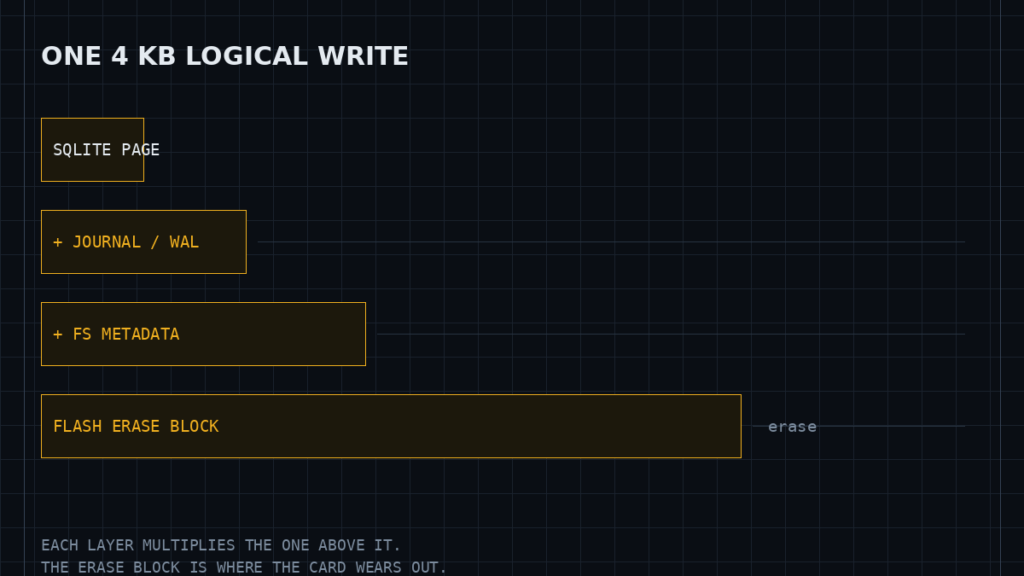
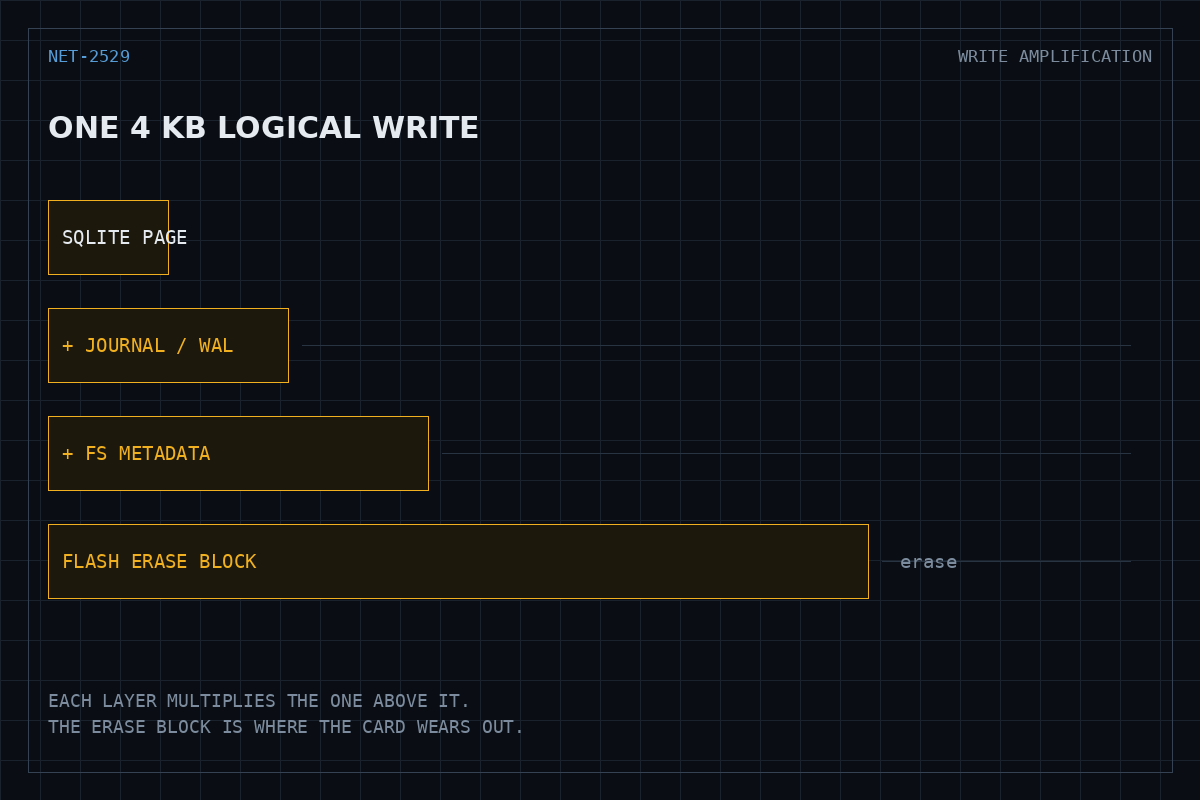
A fundamental limitation of NAND flash is that data cannot be overwritten directly. A physical page must be erased before it can be written to again. However, because erasures can only occur at the block level, modifying a single 4KB page requires a complex sequence known as a Read-Modify-Write (RMW) cycle. The Flash Translation Layer (FTL) in the storage controller must read the entire physical block containing the target page into internal RAM, modify the specific page’s data, erase the physical block on the flash medium, and write the modified block back to the flash. Alternatively, the FTL writes the updated page to an empty physical location and marks the old page as “dirty” or stale, leaving it to be reclaimed later by the controller’s background Garbage Collection (GC) process.
The Mechanics of Write Amplification (WAF)
Write Amplification is the ratio of physical data written to the NAND flash memory relative to the logical data written by the host application. The formula is expressed as:
WAF = Physical Bytes Written to NAND / Logical Bytes Written by Application
In an ideal scenario, the WAF would be exactly 1.0. However, in smart home gateways running out-of-the-box software, the WAF frequently exceeds 50, and can spike as high as 500. Let’s analyze why:
- Small Random Writes: A Zigbee smart plug reports a power draw change of 1.2 watts. The application attempts to write a 100-byte update to the SQLite database. If the file system and FTL are not optimized, this 100-byte write forces a full 4KB page write, which in turn triggers a Read-Modify-Write cycle on a 4MB block. This single transaction can yield an instantaneous WAF of over 40,000 for that specific block.
- Journaling Overhead: Traditional Linux file systems like ext4 use journaling to prevent corruption during power loss. Every database write involves writing to the file system journal, writing to the database file, and updating the directory metadata. This duplicates the write payload before it even reaches the physical disk controller.
- SQLite Rollback Journals: By default, SQLite operates in Rollback Journal mode. To execute a single transaction, it must write the original database page to a rollback journal file, sync the journal to disk, write the changes to the database file, sync the database file, and then delete or truncate the journal file. This sequence requires multiple synchronous system calls (
fsync()), forcing the operating system to bypass write-coalescing caches and commit data directly to the physical NAND.
Consider the math: A typical 32GB TLC (Triple-Level Cell) eMMC chip has an endurance rating of approximately 3,000 Program/Erase (P/E) cycles. This equates to a total write endurance (Terabytes Written, or TBW) of:
TBW = (Capacity in TB * P/E Cycles) / WAF
With a capacity of 32GB (0.032 TB) and a WAF of 1.0, the chip can withstand 96 TB of writes. However, if a poorly optimized smart home system writes 10GB of logical database updates per day with a WAF of 50, the physical writes to the NAND reach 500GB per day. At this rate, the physical wear is 182.5 TB per year, which exceeds the absolute physical limit of the silicon in less than 7 months, leading to unrecoverable read/write failures, file system read-only locks, and complete gateway failure.
+-------------------------------------------------------+
| Smart Home Application (Home Assistant) |
+-------------------------------------------------------+
|
[Sub-KB State Updates / Sec]
v
+-------------------------------------------------------+
| SQLite Engine (Default Rollback Journal) |
| Forces fsync() on every transaction commit |
+-------------------------------------------------------+
|
[Multiple Logical Page Writes]
v
+-------------------------------------------------------+
| Linux Virtual File System (VFS: ext4) |
| Journaling duplicates write payload |
+-------------------------------------------------------+
|
[Block Device I/O Requests]
v
+-------------------------------------------------------+
| eMMC Controller / Wear Leveling Layer |
| Read-Modify-Write (RMW) on 4MB Physical Erase Blocks |
+-------------------------------------------------------+
|
[Massive Physical NAND Wear]
v
+-------------------------------------------------------+
| Physical NAND Flash Cells |
+-------------------------------------------------------+
Comparing Storage Configurations and Lifespans
The table below compares different software stack configurations, demonstrating how database engine settings and file system selections directly impact write amplification and physical storage longevity.
| Configuration Profile | File System | SQLite Journal Mode | Average WAF | Data Loss Risk | Projected Lifespan (32GB eMMC) |
|---|---|---|---|---|---|
| Stock Out-of-the-Box | ext4 (Default) | DELETE (Rollback) | 80 – 150 | Extremely Low | 10 – 15 Months |
| Database-Optimized | ext4 (Default) | WAL (Write-Ahead) | 15 – 30 | Very Low | 4 – 6 Years |
| Flash-Friendly Stack | F2FS | WAL (Write-Ahead) | 3 – 7 | Low (Max 1 sec loss) | 15 – 20 Years |
| Fully Buffered Edge | F2FS + tmpfs | WAL (Cached Sync) | 0.8 – 1.5 | Moderate (Power loss loss) | 35+ Years |
Step-by-Step Implementation Guide to Mitigate Flash Wear
To eliminate excessive write amplification, we must optimize the smart home gateway across three layers: the database engine, the operating system page cache, and the file system itself.
Step 1: Convert SQLite to Write-Ahead Logging (WAL) Mode
Write-Ahead Logging completely changes how SQLite handles transactions. Instead of modifying the database file directly and writing to a rollback journal, WAL writes new transactions sequentially to a separate, auxiliary file named [database_name].db-wal. This file is written to sequentially, which aligns beautifully with NAND flash characteristics. Readers can access the main database file while writers append to the WAL file, eliminating write-blocking lockouts.
To manually convert your smart home platform’s SQLite database to WAL mode, stop your smart home service and run the following commands via your terminal:
# Stop the home automation service (e.g., Home Assistant) sudo systemctl stop [email protected] # Navigate to the database directory cd /home/homeassistant/.homeassistant/ # Open the database using SQLite3 CLI sqlite3 home-assistant_v2.db
Inside the SQLite interactive prompt, execute the following SQL queries to enable WAL mode and optimize transaction execution:
-- Set journal mode to Write-Ahead Logging PRAGMA journal_mode=WAL; -- Set synchronous mode to NORMAL -- In NORMAL mode, the database engine syncs to disk only at critical checkpoints, -- dramatically reducing the frequency of fsync() system calls. PRAGMA synchronous=NORMAL; -- Increase the cache size to retain more pages in RAM (e.g., 10000 pages / ~40MB) PRAGMA cache_size=-10000; -- Set the busy timeout to prevent locking errors under heavy parallel writes PRAGMA busy_timeout=5000; -- Exit the SQLite prompt .quit
Verify that two auxiliary files have been created in the directory: home-assistant_v2.db-shm (shared memory index) and home-assistant_v2.db-wal. Restart your smart home service to apply the changes.
Step 2: Optimize Linux Kernel Dirty Page Writebacks
By default, the Linux kernel flushes dirty pages (modified files held in RAM) to physical storage every 5 seconds. This short window prevents write coalescing, forcing many tiny, discrete writes to hit the flash controller. We can tune the virtual memory (VM) subsystem to buffer writes in RAM longer, allowing the OS to merge multiple sequential writes into a single contiguous block allocation.
Open the system control configuration file:
sudo nano /etc/sysctl.conf
Append the following configuration parameters at the bottom of the file:
# Increase the dirty page writeback interval to 30 seconds (3000 centiseconds) vm.dirty_writeback_centisecs = 3000 # Increase the time a page can remain dirty in memory to 60 seconds vm.dirty_expire_centisecs = 6000 # Begin background writeback only when 10% of system memory is filled with dirty pages vm.dirty_background_ratio = 10 # Force active processes to block and write to disk when dirty pages consume 20% of RAM vm.dirty_ratio = 20
Save and close the file, then apply the changes immediately without restarting:
sudo sysctl -p
Step 3: Move Ephemeral Directories and Logs to tmpfs
System logs, temporary files, and application caches do not need to survive a power cycle. Storing them on flash storage is a needless waste of write endurance. We can configure tmpfs (a dynamic RAM disk) to host these highly volatile directories.
Open your filesystem table configuration:
sudo nano /etc/fstab
Add the following lines to mount temporary directories in system RAM:
# Allocate up to 256MB of RAM for temporary system files tmpfs /tmp tmpfs nodev,nosuid,size=256M 0 0 tmpfs /var/tmp tmpfs nodev,nosuid,size=128M 0 0 # Allocate RAM for system logs tmpfs /var/log tmpfs nodev,nosuid,size=128M,mode=755 0 0
Note: Since mounting /var/log in RAM wipes it on reboot, some services (like Nginx or Apache) might fail to start if their expected subdirectories do not exist. To fix this, create a systemd startup script or use a utility like log2ram to sync logs to disk periodically (e.g., once daily or on clean shutdown).
Step 4: Format and Migrate to F2FS (Flash-Friendly File System)
F2FS was designed specifically for NAND flash-based storage devices. Unlike ext4, which uses an in-place update scheme, F2FS uses a log-structured file system layout. It writes data sequentially to newly allocated areas, which aligns perfectly with the physical page write structure of NAND. It also features built-in static/dynamic wear-leveling and garbage collection algorithms that bypass the FTL’s most inefficient behaviors, drastically reducing the WAF.
To migrate your root filesystem to F2FS, you will need an external Linux machine or a live boot USB. Do not attempt to reformat a mounted, active root filesystem.
1. Install the F2FS tools on your administrative machine:
sudo apt update && sudo apt install f2fs-tools -y
2. Insert your gateway’s SD card or connect its eMMC module. Identify the device path (e.g., /dev/sdX) using lsblk.
3. Backup the existing ext4 root partition data. Mount the source partition and use rsync to preserve all permissions and symlinks:
# Create mount points sudo mkdir -p /mnt/source /mnt/backup # Mount the root partition (e.g., partition 2 of sdX) sudo mount /dev/sdX2 /mnt/source # Copy everything to a temporary backup directory on your host PC sudo rsync -aAXHv /mnt/source/ /mnt/backup/ # Unmount the source partition sudo umount /mnt/source
4. Format the partition as F2FS:
# Format with a 5% over-provisioning space reserve to optimize Garbage Collection sudo mkfs.f2fs -O extra_attr,inode_checksum,sb_checksum -o 5 /dev/sdX2
5. Restore the backup to the new F2FS partition:
# Mount the newly formatted F2FS partition sudo mount -t f2fs /dev/sdX2 /mnt/source # Restore the files sudo rsync -aAXHv /mnt/backup/ /mnt/source/
6. Update the File System Table (fstab) and Boot Command Line:
Because the partition format has changed, you must update the filesystem type in the backup’s fstab file. Open /mnt/source/etc/fstab and locate the root partition line. Change ext4 to f2fs and update the mount options:
# Example fstab entry for F2FS root partition UUID=xxxx-xxxx-xxxx / f2fs defaults,noatime,background_gc=on,discard,user_xattr 0 1
Additionally, if you are using a Raspberry Pi or similar single-board computer, you must update the boot configuration file (typically /boot/cmdline.txt or /boot/armbianEnv.txt) to indicate that the root filesystem is now F2FS:
# Update the rootfstype parameter in cmdline.txt root=/dev/mmcblk0p2 rootfstype=f2fs rootwait
Unmount the partitions safely, eject the storage media, and insert it back into your smart home gateway:
sudo umount /mnt/source sudo rm -rf /mnt/source /mnt/backup
Comprehensive FAQ Section
Why does ext4 perform poorly on flash storage compared to F2FS?
The ext4 file system was designed and optimized for mechanical hard drives. It uses an “in-place” update strategy, meaning that when a file is modified, the file system attempts to overwrite the exact same logical blocks on the disk. For mechanical drives with magnetic platters, this is highly efficient because it minimizes head movement.
However, on flash storage, in-place updates are catastrophic. Because NAND flash cannot overwrite data without erasing an entire block, an in-place update forces the physical storage controller to execute Read-Modify-Write cycles, leading to high write amplification. F2FS, by contrast, is a log-structured file system. It treats the storage space as a continuous log and appends all writes sequentially. This layout perfectly matches the sequential write-once nature of flash pages, bypassing the hardware controller’s RMW overhead and reducing garbage collection overhead.
Can I use a high-end “Endurance” SD card instead of modifying my software stack?
While high-end “Endurance” SD cards (typically utilizing 3D pSLC or high-quality MLC NAND chips) are significantly more resilient than standard consumer cards, they do not solve the underlying issue. An endurance card simply has a larger pool of spare blocks (over-provisioning) and higher P/E cycle limits.
If your software stack has a WAF of 150, you are still subjecting that expensive card to 150 times more physical wear than necessary. Combining an endurance card with the software optimizations detailed above is the gold standard: it can extend your gateway’s operational lifespan to 30+ years, outlasting the useful life of the gateway hardware itself.
What happens to my smart home database if the power cuts out while using WAL mode with “synchronous = NORMAL”?
In SQLite, setting PRAGMA synchronous = NORMAL is extremely safe. Under this setting, the database engine syncs the transaction log to disk at critical checkpoints, but does not force a physical disk sync (fsync()) on every single transaction commit.
If the power cuts out unexpectedly, the database integrity is fully protected. SQLite’s WAL mechanism guarantees that the database will not become corrupted. The worst-case scenario is that transactions committed in the brief window between the last checkpoint and the power loss (typically a fraction of a second to a few seconds of sensor history) might not be written to disk and will be rolled back upon reboot. For smart home applications, losing 2 seconds of temperature history is a trivial trade-off for saving years of hardware life.
How can I measure the actual write volume and calculate WAF on my running Linux gateway?
You can monitor logical writes from the operating system using the sysfs interface or monitoring tools like iotop. To check the total logical sectors written to a block device since boot, run:
cat /sys/block/mmcblk0/stat
The seventh column in this output displays the total number of sectors written (multiply by 512 to convert to bytes).
To measure the actual physical writes to the NAND (which is required to calculate the true WAF), you must query the storage controller’s internal telemetry. If your gateway supports eMMC, you can use the mmc-utils package to query the chip’s health and life estimation registers:
sudo apt install mmc-utils sudo mmc extcsd read /dev/mmcblk0 | grep -E "DEVICE_LIFE_TIME_EST|PRE_EOL_INFO"
This will output the wear levels of the SLC and MLC areas in 10% increments (e.g., 0x01 indicates 0% to 10% wear). By tracking this value over a 30-day period, you can estimate your exact annual consumption of the flash chip’s physical life.
Does disabling the database recorder entirely solve the issue, and what are the trade-offs?
Yes, disabling the database recorder or moving the database entirely to a tmpfs RAM disk will reduce physical write wear to zero. However, the trade-off is the complete loss of historical data.
Without a local database, you will lose the ability to view historical graphs of energy consumption, track temperature trends, analyze security logs, or run automations that rely on past state values (such as calculating the average humidity over the last 3 hours to trigger a bath fan). The optimizations detailed in this article provide a middle ground: you retain 100% of your historical data and analytical capabilities while reducing physical storage wear to negligible levels.
Conclusion
Flash wear-out is the silent killer of edge-deployed smart home gateways. The default configurations of popular database engines and operating system file systems are designed for traditional server hardware with infinite write tolerances, not resource-constrained embedded systems utilizing eMMC or SD cards. By understanding the mechanics of Write Amplification and implementing flash-optimized alternatives—specifically SQLite WAL mode and the F2FS file system—you can transform your smart home gateway from a ticking hardware time-bomb into a resilient, enterprise-grade appliance ready for decades of continuous operation.
About the Author: Sotiris
Sotiris is a senior systems integration engineer and home automation architect with 12+ years of professional experience in enterprise network administration and low-voltage control systems. He has custom-designed and troubleshot home automation networks for hundreds of properties, specializing in RF link analysis, local subnet isolation, and secure local IoT integrations.