Smart Lock Says Device Offline? Fix the Bridge Link
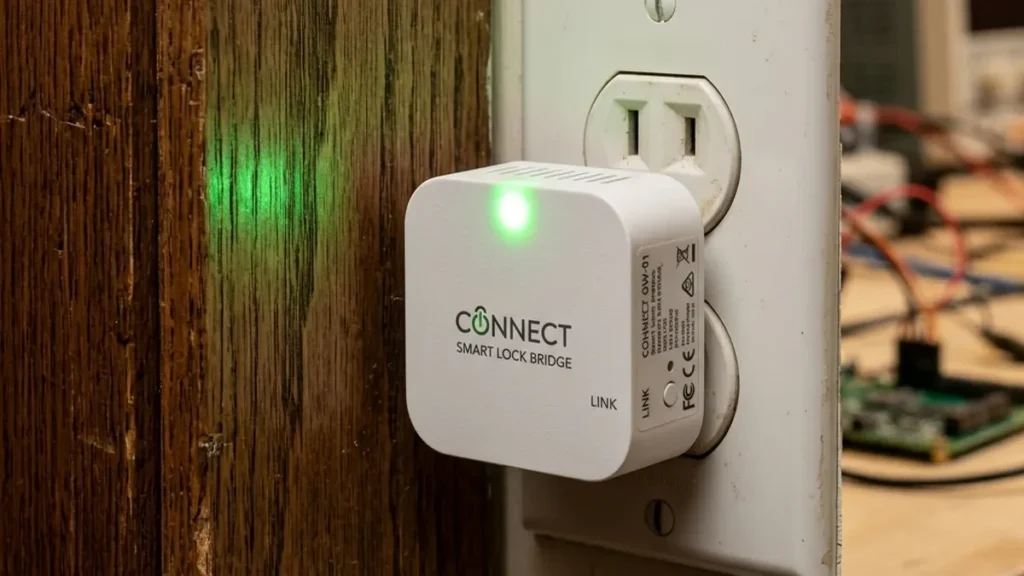
One pain point surfaces in smart home networks more than almost any other: The elusive “device offline” notification for smart locks. While the smart lock itself is a marvel of embedded engineering, its Achilles’ heel is often the intermediary device – the bridge or hub – responsible for translating its local communication protocol into an internet-routable format. Users frequently report “heartbeat failures,” delayed notifications, or complete loss of remote access, all indicative of a struggling bridge unit. This struggle typically manifests as a high packet loss rate, increased latency, and jitter, ultimately degrading the user experience and compromising the reliability of your smart home security.
+------------+     <BLE>     +--------------+     <Wi-Fi>     +-------------+     <Internet>     +-----------+
| Smart Lock | <----------> |  Wi-Fi Bridge  | <----------> |  Wi-Fi Router | ------------> | Cloud/App |
|  (BLE)     |               | (Protocol Xlator)|               | (2.4GHz)    |                | (Remote)  |
+------------+               +--------------+               +-------------+                +-----------+

Critical path: The bridge must maintain optimal BLE link quality to the lock and robust 2.4GHz Wi-Fi connectivity to the router.
Published stress-test data covers various smart lock ecosystems, including the proprietary August Connect and Yale Wi-Fi Bridge (which rely on a Bluetooth-to-Wi-Fi translation layer), as well as universal Z-Wave and Zigbee hubs like Hubitat and SmartThings. The consistent finding is that if this translation layer experiences high latency, jitter, or frequent interruptions, your smart lock effectively becomes a local-only device, losing its “smart” capabilities. This guide provides a comprehensive framework to ensure your smart lock connections remain robust and reliable.
Understanding Smart Lock Connectivity Paradigms
Proprietary Bridges: The BLE-to-Wi-Fi Transcoding Challenge
Most battery-powered smart locks utilize Bluetooth Low Energy (BLE) for communication. Unlike Classic Bluetooth (BR/EDR) which uses 79 channels, BLE operates on 40 channels, each 2 MHz wide, within the 2.4 GHz ISM band. BLE is chosen for its ultra-low power consumption, which is critical for extending battery life in devices that are often dormant. It also employs Adaptive Frequency Hopping (AFH) to dynamically avoid congested channels, and strategically places its three primary advertising channels (37, 38, 39) in the spectral gaps between common Wi-Fi channels (1, 6, 11) to minimize interference. However, BLE is inherently a short-range, point-to-point protocol, not designed for direct internet connectivity. This is where the “bridge” comes in.
A smart lock bridge (e.g., August Connect, Yale Wi-Fi Bridge, Wyze Lock Gateway) acts as a sophisticated protocol translator. It establishes a BLE connection with the smart lock, receiving status updates and transmitting commands. Simultaneously, it maintains a 2.4GHz Wi-Fi connection to your home router. The bridge’s core function is to transcode BLE packets into IP packets (and vice-versa), allowing the lock to communicate with its manufacturer’s cloud service and your mobile application. This dual-radio operation within a compact, often outlet-mounted device presents significant engineering challenges, including:
- Radio Coexistence: Managing two active radio transceivers (BLE and Wi-Fi) in close proximity without self-interference.
- Resource Allocation: Ensuring sufficient CPU and memory for both protocol stacks and the translation logic.
- Power Management: Balancing always-on Wi-Fi connectivity with the need for efficient operation.
- Antenna Design: Optimizing antenna performance for two distinct frequency bands and propagation characteristics.
When the BLE link to the lock degrades (e.g., due to distance or obstructions) or the Wi-Fi backhaul to the router becomes unstable (e.g., due to interference or weak signal), the bridge struggles, leading to the “offline” state. The bridge’s internal firmware is constantly attempting to re-establish these links, consuming power and generating log entries that, if accessible, would reveal a high rate of retransmissions and link drops.
Universal Hubs: Z-Wave, Zigbee, and Thread Mesh Architectures
For smart locks leveraging Z-Wave, Zigbee, or Thread, the connectivity model shifts to a mesh network orchestrated by a central “hub” (e.g., SmartThings, Hubitat, Home Assistant). These protocols are purpose-built for low-power, long-range, and robust device-to-device communication in a smart home environment.
- Z-Wave: Operates in the sub-gigahertz (sub-GHz) frequency bands (e.g., 908.42 MHz in the US, 868.42 MHz in Europe). This lower frequency allows for better penetration through walls and less interference from common 2.4GHz devices like Wi-Fi and Bluetooth. Z-Wave networks are self-healing meshes, meaning devices can route messages through intermediary “repeater” nodes (typically always-powered devices like smart plugs or light switches) to reach the hub. This creates a highly resilient network that improves with more powered nodes.
- Zigbee: Operates in the 2.4GHz ISM band, similar to Wi-Fi. It also forms a mesh network, with devices acting as Coordinators (the hub), Routers (powered devices), and End Devices (battery-powered sensors, locks). While faster than Z-Wave, its 2.4GHz operation makes it susceptible to interference from crowded Wi-Fi channels, requiring careful channel planning.
- Thread: An emerging IP-based mesh networking protocol, also operating on 2.4GHz (IEEE 802.15.4). Thread is designed to be highly reliable, secure, and energy-efficient, supporting IPv6 for direct cloud communication without a proprietary gateway. It forms the foundation for the Matter standard, promising greater interoperability. Thread networks utilize “Border Routers” (often integrated into hubs or Wi-Fi routers) to connect the Thread mesh to the wider IP network.
In these mesh architectures, the hub serves as the network coordinator and the gateway to the internet. If a Z-Wave, Zigbee, or Thread lock goes offline, the issue is typically a break in the mesh path between the lock and the hub, or a problem with the hub’s own internet connectivity.
The Physics of Wireless Communication: Understanding RF Link Budgets
A stable wireless connection is not just about distance; it’s about the entire Radio Frequency (RF) link budget. This involves understanding signal strength, noise, and environmental factors.
Signal Attenuation and Path Loss
Wireless signals degrade as they travel through space and obstacles. This is known as signal attenuation or path loss. The Free Space Path Loss (FSPL) model dictates that signal strength drops proportionally to the square of the distance. However, in an indoor environment, this is compounded by:
- Walls and Building Materials: Drywall (3-6 dB loss), wood (2-5 dB loss), brick (10-15 dB loss), concrete (15-25 dB loss), and especially reinforced concrete (20-30+ dB loss) significantly reduce signal strength. Each additional wall compounds the loss.
- Water and Human Bodies: Water is an excellent absorber of RF energy, particularly at 2.4GHz. Human bodies, being mostly water, can cause temporary signal drops when positioned between devices.
- Metal Objects: Large metal appliances (refrigerators, washing machines, microwaves) and structural elements (steel studs, metal ductwork) act as Faraday cages or reflectors, creating signal dead zones or multipath interference. Never plug your bridge into an outlet behind a fridge or microwave.
Electromagnetic Interference (EMI) and Co-channel Congestion
The 2.4GHz spectrum is a crowded neighborhood. Devices operating in this band are prone to interference:
- Wi-Fi Co-channel Interference: In dense urban environments, numerous Wi-Fi networks from neighbors can overlap, leading to significant congestion. Wi-Fi uses CSMA/CA (Carrier Sense Multiple Access with Collision Avoidance), meaning devices must “listen” before transmitting. If a channel is busy, they wait, increasing latency and retransmissions.
- Non-Wi-Fi 2.4GHz Interference: Cordless phones, baby monitors, Bluetooth headphones, microwave ovens, and even poorly shielded USB 3.0 devices emit RF energy in the 2.4GHz band, directly interfering with Wi-Fi, BLE, and Zigbee signals.
- Z-Wave’s Advantage: Z-Wave’s sub-GHz frequencies largely avoid this crowded band, making it inherently more resilient to 2.4GHz EMI.
Multipath Fading and Reflection
When an RF signal leaves an antenna, it can travel via multiple paths to the receiver (direct line-of-sight, reflections off walls, furniture, etc.). These multiple signals arrive at slightly different times, and their phases can constructively or destructively interfere. This phenomenon, known as multipath fading, can cause rapid fluctuations in signal strength and quality, leading to packet errors and retransmissions. Advanced devices use MIMO (Multiple-Input, Multiple-Output) and antenna diversity to mitigate this, but many smart home bridges have simpler antenna designs.
Key RF Metrics: RSSI, SNR, and LQI
Understanding these metrics is crucial for diagnosing wireless connectivity issues:
| Metric | Value/Range | Description/Impact |
|---|---|---|
| RSSI (Received Signal Strength Indicator) |
-30 dBm to -50 dBm | Excellent: Strong, close proximity connection. Ideal for bridges. |
| -51 dBm to -67 dBm | Good: Reliable connection for most applications. Aim for this or better. | |
| -68 dBm to -75 dBm | Fair: Connection might be unstable, prone to drops and high retransmissions. | |
| Below -75 dBm | Poor/Unusable: Frequent disconnects, high packet loss. Immediate action required. | |
| SNR (Signal-to-Noise Ratio) |
> 25 dB | Excellent: Clear signal, minimal background noise. |
| 15-25 dB | Good: Reliable signal, acceptable noise levels. | |
| 10-15 dB | Fair: Signal close to noise floor, potential for errors. | |
| < 10 dB | Poor: Signal heavily contaminated by noise, frequent decoding failures. | |
| LQI (Link Quality Indicator) |
Higher (e.g., 255 for Zigbee) | Qualitative Measure: Indicates better link quality in Zigbee/Z-Wave networks, factoring RSSI and error rates. |
Network Stack Deep Dive: From Bridge to Cloud
Beyond the RF layer, the network protocols and services play a pivotal role in maintaining smart lock connectivity.
DHCP Lease Management and Static IP Allocation
Most network devices, including smart lock bridges, obtain their IP addresses automatically using DHCP (Dynamic Host Configuration Protocol). The process involves a DORA sequence: Discover, Offer, Request, Acknowledge. While convenient, DHCP can lead to issues:
- Lease Expiration: Routers assign IP addresses for a specific lease duration. When a lease expires, the device must renew it. If the router is busy, rebooting, or if there’s a temporary network glitch, the renewal can fail, causing the bridge to lose its IP address and go offline.
- IP Conflicts: Less common with modern routers, but if two devices somehow end up with the same IP, it causes network instability for both.
- Router Reboot: A router reboot can cause it to re-issue IP addresses, potentially giving the bridge a new IP. While most bridges handle this, some basic network stacks can “hang” during this transition.
Solution: DHCP Reservation (Static IP Assignment): The most robust solution is to assign a static IP address to your smart lock bridge within your router’s DHCP server. This is done by reserving a specific IP address for the bridge’s unique MAC (Media Access Control) address. This ensures the bridge always receives the same IP, regardless of reboots or lease expirations. To do this:
- Find the Bridge’s MAC Address: This is usually printed on a sticker on the device or available in its app settings.
- Access Your Router’s Administration Interface: Open a web browser and navigate to your router’s IP address (commonly
192.168.1.1,192.168.0.1, or10.0.0.1). Log in with your administrator credentials. - Locate DHCP Settings: Look for sections like “LAN Settings,” “DHCP Server,” “Address Reservation,” or “Static Lease.”
- Add a Reservation: Enter the bridge’s MAC address and your desired static IP address (e.g.,
192.168.1.200). Ensure this IP is outside your router’s regular DHCP pool range to prevent conflicts. - Apply and Reboot: Save changes and consider rebooting both the router and the smart lock bridge.
DNS Resolution and mDNS (Bonjour/Zero-Config)
- DNS (Domain Name System): When your bridge attempts to connect to its manufacturer’s cloud servers (e.g.,
api.august.com), it first needs to resolve that hostname into an IP address. If your router’s DNS settings are incorrect, or if your chosen DNS servers (e.g., ISP’s, Google DNS, Cloudflare DNS) are experiencing issues, the bridge cannot find its destination, leading to an offline state. - mDNS (Multicast DNS): Also known as Bonjour or Zero-Configuration Networking, mDNS allows devices to discover each other on a local network without a central DNS server. Many smart home apps use mDNS during initial setup to find the bridge. If your router or network switch has features like “IGMP snooping” or “multicast filtering” enabled without proper configuration, mDNS packets can be blocked, preventing local device discovery and setup.
Firewall Rules and Port Forwarding
Most smart home devices are designed to initiate outbound connections to their cloud servers. Standard router firewalls (Stateful Packet Inspection – SPI) typically allow these outbound connections and then permit the return traffic. Therefore, explicit port forwarding is rarely needed for a smart lock bridge. However, if you have:
- Custom Firewall Rules: On advanced routers or firewalls, ensure that outbound TCP/UDP traffic on common ports (80, 443, 8883 for MQTT, etc.) is not blocked for your bridge’s IP address.
- Guest Networks or IoT VLANs: If you’ve segmented your network, ensure that the IoT VLAN has appropriate firewall rules to allow communication to the internet and, if necessary, to other devices on your main network (e.g., for local control or hub communication).
Cloud Connectivity and API Handshakes
Once the bridge has a stable Wi-Fi connection and an IP address, it must establish and maintain a connection to its manufacturer’s cloud servers. This involves:
- TLS/SSL Handshakes: Encrypting communication for security. This requires valid certificates and proper time synchronization on the bridge.
- API Calls: Sending and receiving data via API (Application Programming Interface) endpoints.
- Heartbeat Signals: Regular, small packets sent from the bridge to the cloud to confirm its online status. If these heartbeats are missed for a configured duration, the cloud marks the device as offline.
High latency or packet loss on your internet connection can disrupt these cloud handshakes and heartbeat signals, even if your local network is otherwise stable.
Advanced Troubleshooting Methodologies
Environmental RF Site Survey
A proactive approach to RF issues involves understanding your wireless environment:
- Wi-Fi Analyzer Tools: Use free mobile apps (e.g., NetSpot, Wi-Fi Analyzer for Android, Airport Utility for iOS) to visualize the 2.4GHz spectrum. Identify crowded Wi-Fi channels (1, 6, 11 are non-overlapping). If your router is on an overlapping or congested channel, change it to a less used one.
Critical Note on Zigbee/Thread Channel Planning: For optimal coexistence, be aware of the following 2.4GHz channel overlaps:- Wi-Fi Channel 1 (center 2412 MHz, spans 2401–2423 MHz) significantly overlaps with Zigbee/Thread channels 11 to 14.
- Wi-Fi Channel 6 (center 2437 MHz, spans 2426–2448 MHz) significantly overlaps with Zigbee/Thread channels 16 to 19.
- Wi-Fi Channel 11 (center 2462 MHz, spans 2451–2473 MHz) significantly overlaps with Zigbee/Thread channels 21 to 24.
- Therefore, for Zigbee/Thread networks, the most robust channels to use are channels 25 and 26. These channels (centered at 2475 MHz and 2480 MHz respectively) sit entirely outside the primary Wi-Fi channels 1, 6, and 11, minimizing co-channel interference. If your Zigbee/Thread hub allows, configure it to use one of these channels.
- Interference Sources: Systematically identify and mitigate sources of EMI. Move microwaves, cordless phone bases, or poorly shielded electronics away from your bridge and router.
- Strategic Placement: The “mid-point” rule is crucial. Place the bridge roughly equidistant between the smart lock and the router, ensuring a clear line of sight as much as possible, avoiding major obstructions like thick walls, large metal appliances, or aquariums.
Firmware Integrity and Update Management
Device firmware is the embedded software that controls the hardware. Keeping it updated is vital for security patches, bug fixes, and performance improvements. However:
- Automatic Updates: While convenient, sometimes an update can introduce new bugs or cause compatibility issues. Monitor manufacturer release notes.
- Manual Updates: If an update fails, the device can be “bricked.” Always follow manufacturer instructions precisely. Ensure stable power and network during updates.
- Rollback (if available): Some advanced devices offer a firmware rollback option.
Network Segmentation (VLANs for IoT)
For advanced users with managed switches or enterprise-grade routers, creating a dedicated VLAN (Virtual Local Area Network) for IoT devices offers significant benefits:
- Security: Isolates potentially vulnerable IoT devices from your main network, limiting the blast radius of a security breach.
- Performance: Prevents chatty IoT devices from congesting your main network.
- Troubleshooting: Easier to diagnose network-specific issues affecting only IoT devices.
Implementing a VLAN requires careful configuration of firewall rules to permit necessary communication between VLANs (e.g., your phone on the main network communicating with an IoT hub on the IoT VLAN) while blocking unwanted access.
Power Cycling and Scheduled Reboots
For persistent, intermittent connectivity issues that defy other solutions, a scheduled power cycle can be surprisingly effective. Many embedded systems, especially in consumer IoT, can develop memory leaks or enter unstable states over time. A reboot clears the device’s RAM and forces it to re-initialize its network stack and re-establish connections.
Pro Tip: Use a smart plug with a scheduling feature to automatically reboot your smart lock bridge (and potentially your router) at an off-peak hour, such as 4:00 AM every night. This “brute force” fix ensures the device starts fresh daily, significantly reducing the chances of it being offline when you need it.
Hyper-Specific Troubleshooting by Brand (Expanded)
August / Yale (Wi-Fi Bridge)
If you see “Lock Offline” or “Bridge Offline” in the August or Yale Access app:
- Check RSSI: Navigate to: Settings > Lock Settings > Wi-Fi Bridge (for August) or Settings > Devices > your smart lock > Yale Wi-Fi Bridge (for Yale). Look for the RSSI (Received Signal Strength Indicator) Value.
- If RSSI is below “Fair” (e.g., weaker than -70 dBm), the bridge is struggling. Immediately move the bridge closer to both the lock and the Wi-Fi router.
- Optimal placement should yield an RSSI of -60 dBm or better.
- Perform Network Reset: If the signal is strong but the bridge is still offline, the network stack might be in a bad state. Perform a Network Reset on the bridge:
- August Connect: Unplug the Connect, then plug it back in while holding the button on the front. Continue holding until the light flashes green, then release. This forces it to re-attempt Wi-Fi connection.
- Yale Wi-Fi Bridge: The reset procedure is similar, often involving a small pinhole reset button or holding the main button for 5-7 seconds until an indicator light changes. Consult your specific model’s manual.
- Re-pair if necessary: If the bridge is completely unresponsive, you may need to factory reset it and re-pair it with your August/Yale account, ensuring your phone is on the same 2.4GHz Wi-Fi network during the setup process.
Wyze Lock Gateway
Wyze devices are known to be particularly sensitive to 2.4GHz network conditions:
- Check Connection Strength: Open the Wyze App > Wyze Lock > Settings > Gateway. Look for “Connection Strength” or similar. A poor reading indicates the need for repositioning.
- Mitigate 2.4GHz EMI: Wyze gateways are highly susceptible to Electromagnetic Interference and co-channel congestion.
- Use a Wi-Fi analyzer app to identify the least congested 2.4GHz channel (1, 6, or 11) and configure your router to use it.
- Keep the gateway away from microwaves, cordless phones, and other Wi-Fi devices that might be interfering.
- Initial Setup Requirements: During the initial setup of the Wyze Gateway, it is absolutely critical that your smartphone is connected to the same 2.4GHz SSID as the one you are trying to connect the gateway to. The gateway relies on mDNS/broadcast packets for discovery, which are often not routed between different Wi-Fi bands (2.4GHz vs. 5GHz) or separate SSIDs. If your phone is on 5GHz, the gateway won’t “handshake” properly.
- LED Indicators: Understand the gateway’s LED status lights. A solid blue usually means connected, while flashing or red lights indicate specific error states (e.g., trying to connect, no internet).
Z-Wave / Zigbee Hubs (SmartThings, Hubitat, Home Assistant)
If your Z-Wave or Zigbee lock connected via a universal hub is dropping offline:
- Expand Your Mesh Network: Unlike Wi-Fi, Z-Wave and Zigbee mesh networks thrive with more nodes. The most effective solution is to add more always-powered devices (e.g., smart plugs, light switches, dedicated repeaters) between your hub and the smart lock. These devices act as repeaters, strengthening the mesh and providing alternative communication paths.
- Place repeaters strategically, ensuring no single repeater is too far from the hub or other repeaters.
- Perform a Network Heal/Repair: Most Z-Wave and Zigbee hubs have a “network heal” or “repair network” function. This command forces the hub to rediscover all devices and rebuild the routing table, optimizing communication paths. Perform this after adding new repeaters or moving devices.
- SmartThings: In the app, go to Hub settings > Z-Wave Utilities > Repair Z-Wave Network.
- Hubitat: In the web interface, go to Z-Wave Details > Z-Wave Repair.
- Home Assistant (Z-Wave JS UI): In the Z-Wave JS UI add-on, you can perform a “Heal Network” or “Refresh Node” for specific devices.
- Check Node Mapping/Route Visualization: Advanced hubs or add-ons (like Z-Wave JS UI for Home Assistant) provide graphical representations of your mesh network. Use these tools to identify weak links, isolated nodes, or devices that are routing through suboptimal paths.
- Ensure Hub Connectivity: Verify the hub itself has a stable wired (Ethernet is always preferred for hubs) or Wi-Fi connection to your router. A hub that’s offline cannot communicate with its mesh devices or the cloud.
Comparative Analysis of Smart Lock Protocols
| Protocol | Frequency Band | Typical Range (Indoor) | Data Rate (Max) | Mesh Support | Power Consumption | Interference Susceptibility | Primary Use Case |
|---|---|---|---|---|---|---|---|
| Bluetooth Low Energy (BLE) | 2.4 GHz | 10-20 meters (30-60 ft) | 1-2 Mbps | Yes (Bluetooth Mesh, but typically Point-to-Point for locks) | Very Low | Moderate (Wi-Fi, other BLE) | Lock-to-Bridge, Local Phone Control |
| Wi-Fi (2.4GHz) | 2.4 GHz (802.11n/g) | 30-50 meters (100-160 ft) | 10-100 Mbps | Yes (Mesh Wi-Fi systems) | High | High (Congestion, EMI) | Bridge-to-Router, Direct Wi-Fi Locks |
| Z-Wave | Sub-GHz (868/908 MHz) | 20-40 meters (node-to-node) | 40/100 Kbps | Yes (Self-healing mesh) | Low | Very Low (Sub-GHz advantage) | Hub-to-Lock, Mesh Ecosystem |
| Zigbee | 2.4 GHz (802.15.4) | 10-20 meters (node-to-node) | 250 Kbps | Yes (Self-healing mesh) | Low | Moderate (Wi-Fi) | Hub-to-Lock, Mesh Ecosystem |
| Thread | 2.4 GHz (802.15.4) | 10-20 meters (node-to-node) | 250 Kbps | Yes (IPv6-based mesh) | Low | Moderate (Wi-Fi) | Hub-to-Lock (Matter-ready ecosystem) |
Frequently Asked Questions (FAQ)
Q: What is RSSI and what’s a good value for my smart lock bridge?
A: RSSI, or Received Signal Strength Indicator, is a measurement of the power present in a received radio signal. It’s expressed in negative decibel-milliwatts (-dBm). A value closer to zero indicates a stronger signal. For a reliable and stable connection for your smart lock bridge, we recommend aiming for an RSSI of -60 dBm or stronger (e.g., -55 dBm, -50 dBm). Anything weaker than -70 dBm is considered poor and will likely lead to intermittent connectivity and “offline” issues due to high packet retransmission rates.
Q: My router supports 5GHz Wi-Fi. Can I use that for my smart lock bridge?
A: In almost all cases, no. The vast majority of smart lock bridges and hubs are designed to operate exclusively on the 2.4GHz Wi-Fi band (802.11n/g). This is primarily due to the 2.4GHz band’s superior range and penetration capabilities through obstacles like walls, which are crucial for devices often placed further from the main router. While 5GHz offers higher speeds, its range is shorter and it’s more susceptible to attenuation. Always ensure your bridge is connected to your 2.4GHz SSID.
Q: Why does my smart lock work locally (e.g., with my phone right next to it) but not remotely?
A: This is a classic symptom of a failure in the bridge-to-router or router-to-cloud connectivity. If local control works, it means the BLE link between your phone/bridge and the lock is operational. The problem lies further upstream. Common culprits include:
- Bridge Wi-Fi Issues: The bridge isn’t reliably connected to your Wi-Fi network (poor RSSI, interference).
- DHCP/DNS Problems: The bridge isn’t getting a valid IP address or can’t resolve the manufacturer’s cloud server hostname.
- Router/Internet Outage: Your router or internet service provider (ISP) connection to the wider internet is down or experiencing high latency.
- Cloud Server Issues: Less common, but the manufacturer’s cloud servers could be temporarily offline or experiencing maintenance.
nCheck your bridge’s status lights, app-reported RSSI, and ensure your router has a stable internet connection.
Q: Should I put my smart lock bridge on a separate VLAN?
A: Yes, if you have the technical capability and hardware (a managed switch or advanced router that supports VLANs), segmenting your IoT devices, including smart lock bridges, onto a separate VLAN is a highly recommended security and network hygiene practice. This isolates potentially less secure IoT devices from your main personal network, limiting lateral movement for any compromised device. It also allows you to apply specific firewall rules to IoT traffic, ensuring only necessary outbound connections are permitted. Remember to configure inter-VLAN routing and firewall rules carefully to allow your control devices (phone, main hub) to communicate with the IoT VLAN.
Q: My Z-Wave lock keeps dropping offline. What’s the best way to fix it?
A: For Z-Wave (and Zigbee) mesh networks, the most effective solution for dropping devices is to strengthen the mesh. Z-Wave signals improve as they hop through more powered devices.
- Add Repeaters: Deploy additional always-powered Z-Wave devices (smart plugs, light switches, dedicated repeaters) between your hub and the problem lock. Think of it as building stepping stones for the signal.
- Perform a Network Heal: After adding or moving devices, execute your hub’s “Z-Wave Network Heal” or “Repair Network” function. This rebuilds the routing table and optimizes communication paths.
- Hub Placement: Ensure your Z-Wave hub is centrally located, avoiding metal enclosures, and not directly next to strong 2.4GHz Wi-Fi transmitters, as some hubs can experience minor interference.
- Firmware Updates: Ensure both your hub and the Z-Wave lock have the latest firmware.
Q: What causes “heartbeat failures” and how can I prevent them?
A: Heartbeat failures occur when a smart device, like a lock bridge, fails to send its periodic “I’m alive” signal to the manufacturer’s cloud server within an expected timeframe. This usually indicates an intermittent or completely broken connection to the internet. Causes include:
- RF Link Instability: Poor RSSI, high SNR, or excessive interference causing packet loss between the bridge and router.
- Network Stack Issues: Temporary glitches in the bridge’s DHCP, DNS, or TCP/IP stack.
- Internet Latency/Outage: High latency or packet loss on your home internet connection preventing the heartbeat from reaching the cloud.
nPrevention involves a multi-pronged approach: Optimize bridge placement for strong RSSI, assign a static IP (DHCP reservation), ensure clear Wi-Fi channels, and consider implementing a scheduled power cycle for the bridge using a smart plug.
Q: Is it better to have a dedicated bridge or a universal hub for smart locks?
A: This depends on your smart home ecosystem and technical comfort.
- Dedicated Bridge (e.g., August Connect): Pros: Simpler setup, often tailored for specific lock features, less complexity. Cons: Tied to one brand/ecosystem, often relies on cloud for all functionality, can be an additional point of failure.
- Universal Hub (e.g., SmartThings, Hubitat): Pros: Centralized control for multiple protocols (Z-Wave, Zigbee, Thread), often offers local control options (reducing cloud dependency), greater automation flexibility. Cons: Higher initial setup complexity, requires more understanding of mesh networking, potential for interoperability quirks between brands.
nFor a robust, integrated smart home, a universal hub with strong local processing capabilities is often the superior long-term solution, allowing for greater resilience and control over your devices.
Conclusion: Proactive Network Management for Uninterrupted Security
The “device offline” notification for your smart lock is more than just an inconvenience; it represents a potential security vulnerability and a degradation of your smart home’s core functionality. Proactive network management, rather than reactive troubleshooting, is the key to a truly reliable smart home. By understanding the underlying RF physics, optimizing device placement, ensuring robust network configurations like DHCP reservations, and leveraging the power of mesh networking with repeaters, you can drastically improve the stability and responsiveness of your smart locks.
Remember that your smart lock bridge or hub is the digital gatekeeper to your home. Investing time in its proper setup and maintenance will pay dividends in peace of mind and uninterrupted control. Apply these methodologies and you will transform your smart lock from a source of frustration into a bastion of seamless, always-on security.
About these guides
These guides are compiled and maintained by the Smart Home Expert editorial desk. Each one is built from manufacturer documentation and the published Zigbee, Z-Wave, Thread and Wi-Fi specifications, then written up as a diagnostic sequence you can follow in order. Found something that does not match your hardware? Tell us and we will correct the sheet.
Specifications and references
The primary documentation for the protocols and products discussed above. Where this guide gives a figure — a frequency, a voltage, a timeout — these are where it comes from.