SQLite Write Amplification: Why Smart Home Gateways Wear Out SD Cards
A gateway that has run for months without complaint starts throwing database errors, or simply stops recording history. The card is not “corrupted” in the sense of a bad batch. It has been worn out by a workload that looks tiny on paper and is enormous once it reaches the flash.
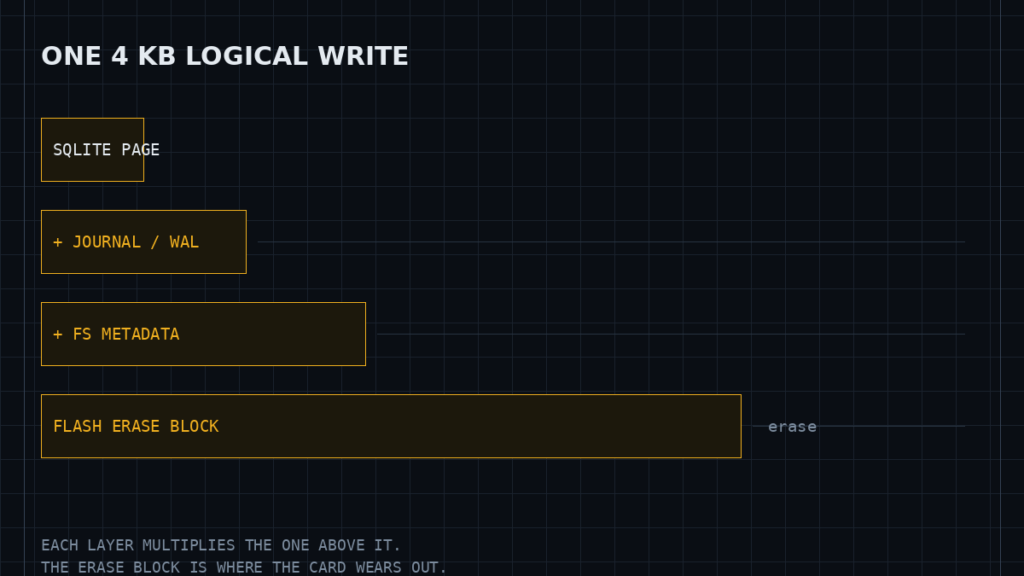
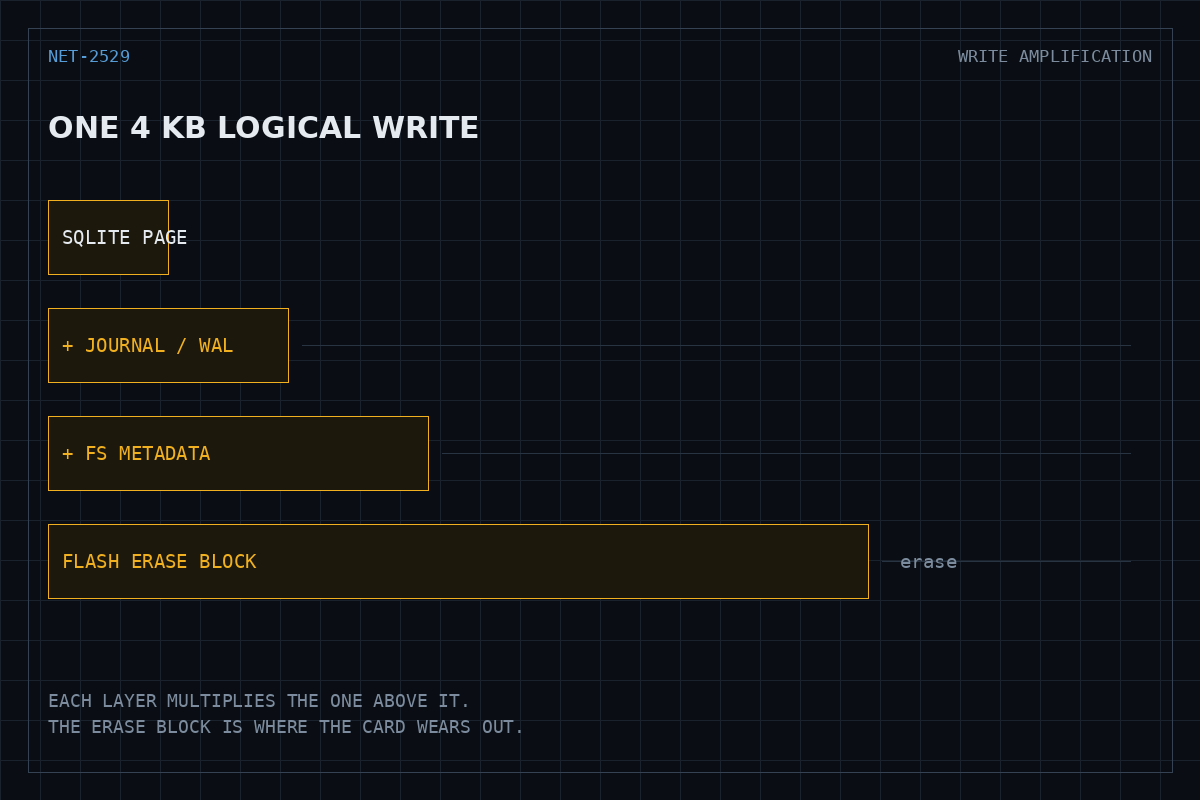
This is a write amplification problem. Understanding it means following a single sensor update down through four layers, each of which multiplies the bytes written by the one above it.
Where the writes actually come from
On a Home Assistant installation the recorder integration persists state changes to SQLite by default. Every entity that changes state produces rows in the states and events tables. A power meter reporting once per second, a handful of RSSI sensors, and a device tracker that flaps between home and away will together generate far more transactions than the handful of lights and locks a user thinks of as “the smart home”.
The important property is that the cost is per transaction, not per byte. A row holding a four-byte integer does not cost four bytes on disk. It costs at minimum one database page, and usually a great deal more.
The four multipliers
1. SQLite page granularity
SQLite reads and writes whole pages. The default page size is 4096 bytes, adjustable through PRAGMA page_size. Modifying one row rewrites every page that row touches, plus any index pages that change. A single state insert commonly dirties the table page and two or three index pages.
2. The journal
To make commits atomic, SQLite must write the data twice in some form. In the default rollback journal mode it copies the original pages to a journal file, modifies the database, then deletes the journal — the sequence described in the atomic commit documentation. In write-ahead logging mode the new pages are appended to a WAL file and later checkpointed back into the database, so each page is still written twice, but sequentially and with fewer fsyncs.
WAL is generally the better choice on flash because sequential appends align better with how the device manages erase blocks, and because readers no longer block the writer. It is not a reduction in total bytes written.
3. The filesystem
A journalling filesystem adds its own duplication. On ext4 the default data=ordered mode journals metadata, so each database write also produces inode and block-bitmap updates. F2FS was designed for flash and turns scattered updates into sequential segment writes, which suits this workload better than ext4 does.
4. The flash erase block
This is the multiplier that does the damage. NAND flash cannot overwrite in place. It erases in blocks — typically hundreds of kilobytes to several megabytes — and writes in much smaller pages. Changing 4 KB inside an erase block means the controller must relocate the surrounding valid data and erase the block. The kernel MMC documentation describes the interface; the translation layer that does this relocation lives inside the card and is not visible to the host.
The result is that a 4 KB logical write can consume an erase cycle on a much larger physical region. Consumer SD cards have shallow over-provisioning and simple wear levelling, which is why they fail at this workload while an eMMC or a small SSD survives it.
Diagnosing it before replacing hardware
Measure the write volume rather than assuming it. On Linux, /proc/diskstats exposes sectors written per device; sampling it an hour apart and multiplying by the sector size gives a real figure for daily writes. Compare that against the database growth over the same period. A gateway writing gigabytes per day to store a few megabytes of new history is amplifying by a large factor, and the fix is upstream in the write volume, not downstream in the storage.
It is also worth checking which entities dominate. Recorder can be queried directly for row counts grouped by entity, and the answer is frequently one or two sensors producing the large majority of rows.
Reducing the writes
- Exclude high-frequency entities from recorder. Signal strength, uptime counters and per-second power readings are rarely worth persisting. This is the single largest lever, because it removes transactions rather than making them cheaper.
- Shorten retention. The recorder
purge_keep_dayssetting bounds database size. Note that purging deletes rows but does not return space to the filesystem until a VACUUM, which itself rewrites the entire database and should not be scheduled frequently. - Enable WAL if it is not already active, for the sequential-write and concurrency benefits described above.
- Move the database off the boot card. An external SSD, or a recorder backend on another machine, removes the problem rather than mitigating it.
The corruption failure mode is separate
Wear-out and corruption are different faults that get reported the same way. SQLite documents the causes of corruption in detail in How To Corrupt An SQLite Database File. The relevant one for gateways is loss of power during a commit combined with a storage stack that acknowledges writes before they are durable.
PRAGMA synchronous controls how aggressively SQLite forces data to the platter. Lowering it from FULL to NORMAL reduces fsync calls and therefore write cost, and in WAL mode is generally considered safe against application crashes — but it widens the window in which a sudden power cut can leave a torn commit. On a device with no orderly shutdown path, that trade is not free.
If the gateway loses power regularly, the durable fix is a supply that allows a clean shutdown. No pragma setting substitutes for that.
Choosing storage that survives
The ranking for this workload is straightforward: a small SATA or NVMe SSD outlasts eMMC, which outlasts a consumer SD card, largely because of over-provisioning and the sophistication of the wear-levelling layer. Endurance ratings quoted for cards are derived from sequential workloads and do not describe the small random synchronous writes a database produces, so treat them as an upper bound that this workload will not reach.
Specifications and references
The primary documentation for the software and interfaces discussed above.